<?xml version="1.0" encoding="utf-8"?>
<feed version="0.3" xmlns="http://purl.org/atom/ns#" xmlns:dc="http://purl.org/dc/elements/1.1/" xml:lang="en">
<title>g9g :: The oft-disjointed thoughts of Porter Glendinning</title>
<link rel="alternate" type="text/html" href="http://www.g9g.org/" />
<modified>2010-05-25T01:42:59Z</modified>
<tagline></tagline>
<id>tag:www.g9g.org,2013://1</id>
<generator url="http://www.movabletype.org/" version="4.35-en">Movable Type</generator>
<copyright>Copyright (c) 2010, Porter Glendinning</copyright>

<entry>
<title>Having far too much fun with the Echo Nest Remix API</title>
<link rel="alternate" type="text/html" href="http://www.g9g.org/backblog/2010/05/24/having-far-too-much-fun-with-the-echo-nest-remix-api.html?utm_campaign=feeds" />
<modified>2010-05-25T01:42:59Z</modified>
<issued>2010-05-25T01:12:47Z</issued>
<id>tag:www.g9g.org,2010://1.59</id>
<created>2010-05-25T01:12:47Z</created>
<author>
<name>porter</name>
<url>http://www.g9g.org/?utm_campaign=feeds</url>
<email>porter@cerebellion.com</email>
</author>

<content type="text/html" mode="escaped" xml:lang="en" xml:base="http://www.g9g.org/">
<![CDATA[<p>Over the weekend I saw <a href="http://musicmachinery.com/2010/05/21/the-swinger/">this post by Paul Lamere</a> about a Python script by <a href="http://web.media.mit.edu/~tristan/">Tristan Jehan</a> called the Swinger that uses the <a href="http://code.google.com/p/echo-nest-remix/">Echo Nest Remix API</a> to alter the beat of a recording. It works by alternately stretching and shortening beats to create a pseudo-swing effect. It&#8217;s really rather addictive once you&#8217;ve started:</p>

<h3>Hungry Like the Wolf</h3>

<p><object height="81" width="100%"> <param name="movie" value="http://player.soundcloud.com/player.swf?url=http%3A%2F%2Fsoundcloud.com%2Fporterg%2Fhungry-like-the-wolf-swing-33&amp;show_comments=true&amp;auto_play=false&amp;color=ad0000"></param> <param name="allowscriptaccess" value="always"></param> <embed allowscriptaccess="always" height="81" src="http://player.soundcloud.com/player.swf?url=http%3A%2F%2Fsoundcloud.com%2Fporterg%2Fhungry-like-the-wolf-swing-33&amp;show_comments=true&amp;auto_play=false&amp;color=ad0000" type="application/x-shockwave-flash" width="100%"></embed> </object></p>

<h3>Come Out and Play</h3>

<p><object height="81" width="100%"> <param name="movie" value="http://player.soundcloud.com/player.swf?url=http%3A%2F%2Fsoundcloud.com%2Fporterg%2Fcome-out-and-play-swing-33&amp;show_comments=true&amp;auto_play=false&amp;color=ad0000"></param> <param name="allowscriptaccess" value="always"></param> <embed allowscriptaccess="always" height="81" src="http://player.soundcloud.com/player.swf?url=http%3A%2F%2Fsoundcloud.com%2Fporterg%2Fcome-out-and-play-swing-33&amp;show_comments=true&amp;auto_play=false&amp;color=ad0000" type="application/x-shockwave-flash" width="100%"></embed> </object></p>

<h3>Take Me I&#8217;m Yours</h3>

<p><object height="81" width="100%"> <param name="movie" value="http://player.soundcloud.com/player.swf?url=http%3A%2F%2Fsoundcloud.com%2Fporterg%2Ftake-me-im-yours-swing-33&amp;show_comments=true&amp;auto_play=false&amp;color=ad0000"></param> <param name="allowscriptaccess" value="always"></param> <embed allowscriptaccess="always" height="81" src="http://player.soundcloud.com/player.swf?url=http%3A%2F%2Fsoundcloud.com%2Fporterg%2Ftake-me-im-yours-swing-33&amp;show_comments=true&amp;auto_play=false&amp;color=ad0000" type="application/x-shockwave-flash" width="100%"></embed> </object></p>

<h3>The Bad Touch</h3>

<p><object height="81" width="100%"> <param name="movie" value="http://player.soundcloud.com/player.swf?url=http%3A%2F%2Fsoundcloud.com%2Fporterg%2Fthe-bad-touch-swing-33&amp;show_comments=true&amp;auto_play=false&amp;color=ad0000"></param> <param name="allowscriptaccess" value="always"></param> <embed allowscriptaccess="always" height="81" src="http://player.soundcloud.com/player.swf?url=http%3A%2F%2Fsoundcloud.com%2Fporterg%2Fthe-bad-touch-swing-33&amp;show_comments=true&amp;auto_play=false&amp;color=ad0000" type="application/x-shockwave-flash" width="100%"></embed> </object></p>

<h3>Coconut</h3>

<p><object height="81" width="100%"> <param name="movie" value="http://player.soundcloud.com/player.swf?url=http%3A%2F%2Fsoundcloud.com%2Fporterg%2Fcoconut-swing-33&amp;show_comments=true&amp;auto_play=false&amp;color=ad0000"></param> <param name="allowscriptaccess" value="always"></param> <embed allowscriptaccess="always" height="81" src="http://player.soundcloud.com/player.swf?url=http%3A%2F%2Fsoundcloud.com%2Fporterg%2Fcoconut-swing-33&amp;show_comments=true&amp;auto_play=false&amp;color=ad0000" type="application/x-shockwave-flash" width="100%"></embed> </object></p>

<h3>Video Killed the Radio Star</h3>

<p><object height="81" width="100%"> <param name="movie" value="http://player.soundcloud.com/player.swf?url=http%3A%2F%2Fsoundcloud.com%2Fporterg%2Fvideo-killed-the-radio-star-swing-33&amp;show_comments=true&amp;auto_play=false&amp;color=ad0000"></param> <param name="allowscriptaccess" value="always"></param> <embed allowscriptaccess="always" height="81" src="http://player.soundcloud.com/player.swf?url=http%3A%2F%2Fsoundcloud.com%2Fporterg%2Fvideo-killed-the-radio-star-swing-33&amp;show_comments=true&amp;auto_play=false&amp;color=ad0000" type="application/x-shockwave-flash" width="100%"></embed> </object></p>

<h3>Barbie Girl</h3>

<p><object height="81" width="100%"> <param name="movie" value="http://player.soundcloud.com/player.swf?url=http%3A%2F%2Fsoundcloud.com%2Fporterg%2Fbarbie-girl-swing-33&amp;show_comments=true&amp;auto_play=false&amp;color=ad0000"></param> <param name="allowscriptaccess" value="always"></param> <embed allowscriptaccess="always" height="81" src="http://player.soundcloud.com/player.swf?url=http%3A%2F%2Fsoundcloud.com%2Fporterg%2Fbarbie-girl-swing-33&amp;show_comments=true&amp;auto_play=false&amp;color=ad0000" type="application/x-shockwave-flash" width="100%"></embed> </object></p>

<h3>Hollaback Girl</h3>

<p><object height="81" width="100%"> <param name="movie" value="http://player.soundcloud.com/player.swf?url=http%3A%2F%2Fsoundcloud.com%2Fporterg%2Fhollaback-girl-swing-33&amp;show_comments=true&amp;auto_play=false&amp;color=ad0000"></param> <param name="allowscriptaccess" value="always"></param> <embed allowscriptaccess="always" height="81" src="http://player.soundcloud.com/player.swf?url=http%3A%2F%2Fsoundcloud.com%2Fporterg%2Fhollaback-girl-swing-33&amp;show_comments=true&amp;auto_play=false&amp;color=ad0000" type="application/x-shockwave-flash" width="100%"></embed> </object></p>
]]>


</content>
</entry>

<entry>
<title>Apocalypsnow</title>
<link rel="alternate" type="text/html" href="http://www.g9g.org/backblog/2010/02/14/apocalypsnow.html?utm_campaign=feeds" />
<modified>2010-02-14T19:54:43Z</modified>
<issued>2010-02-14T19:06:33Z</issued>
<id>tag:www.g9g.org,2010://1.58</id>
<created>2010-02-14T19:06:33Z</created>
<author>
<name>porter</name>
<url>http://www.g9g.org/?utm_campaign=feeds</url>
<email>porter@cerebellion.com</email>
</author>

<content type="text/html" mode="escaped" xml:lang="en" xml:base="http://www.g9g.org/">
<![CDATA[<div class="inset">
<a href="http://www.flickr.com/photos/g9g/4336467246/"><img src="http://farm5.static.flickr.com/4036/4336467246_87372c86b7_m.jpg" width="240" height="159" alt="Old Baltimore at dusk" /></a>  <div class="caption"><a href="http://www.flickr.com/photos/g9g/4336467246/">Old Baltimore at dusk</a></div>
</div>

<p>It&#8217;s been an absolutely crazy week. Starting a week ago Friday evening and going nearly non-stop through this past Wednesday we were walloped with just shy of 50&#34; of snow in three separate waves. After the first round, I was able to get out walking for a few hours on Saturday evening and took <a href="http://www.flickr.com/photos/g9g/sets/72157623367931698/">a few photos of the surrounding neighborhood</a>.</p>

<p>All told, I spent five out of six days shoveling for multiple hours at a time by hand&#8212;no fancy snowthrower for me&#8212;just to keep up with the snowfall and plow filling my driveway with ice boulders. [Thanks for that guys.] <a href="http://twitter.com/lglendinning/status/8916658542">According to Laura</a>, it might have gotten to me just a little&#8230;</p>

<p>What started as <a href="http://twitter.com/#search?q=from%3Aporter+shovelor">a narration on Twitter of the week&#8217;s shoveling</a> and a little video clip I&#8217;d shot out of our bedroom window, this weekend, turned into a trailer for the feature film:</p>

<p><object type="application/x-shockwave-flash" width="500" height="281" data="http://www.flickr.com/apps/video/stewart.swf?v=71377" classid="clsid:D27CDB6E-AE6D-11cf-96B8-444553540000"> <param name="flashvars" value="intl_lang=en-us&amp;photo_secret=bee714ca27&amp;photo_id=4357082918&amp;hd_default=false"></param> <param name="movie" value="http://www.flickr.com/apps/video/stewart.swf?v=71377"></param> <param name="bgcolor" value="#000000"></param> <param name="allowFullScreen" value="true"></param><embed type="application/x-shockwave-flash" src="http://www.flickr.com/apps/video/stewart.swf?v=71377" bgcolor="#000000" allowfullscreen="true" flashvars="intl_lang=en-us&amp;photo_secret=bee714ca27&amp;photo_id=4357082918&amp;hd_default=false" height="281" width="500"></embed></object></p>

<p>Any studios interested in the rights should feel free to contact me.</p>
]]>


</content>
</entry>

<entry>
<title>Duncan Edward Glendinning</title>
<link rel="alternate" type="text/html" href="http://www.g9g.org/backblog/2009/11/29/duncan-edward-glendinning.html?utm_campaign=feeds" />
<modified>2009-12-22T00:53:27Z</modified>
<issued>2009-11-29T20:10:34Z</issued>
<id>tag:www.g9g.org,2009://1.57</id>
<created>2009-11-29T20:10:34Z</created>
<author>
<name>porter</name>
<url>http://www.g9g.org/?utm_campaign=feeds</url>
<email>porter@cerebellion.com</email>
</author>

<content type="text/html" mode="escaped" xml:lang="en" xml:base="http://www.g9g.org/">
<![CDATA[<div class="inset">
  <a href="http://www.flickr.com/photos/g9g/4080099599/"><img src="http://farm3.static.flickr.com/2708/4080099599_570bc30e2e_m.jpg" width="240" height="159" alt="Thoughtful" /></a>
  <div class="caption"><a href="http://www.flickr.com/photos/g9g/4080099599/">Duncan Edward Glendinning</a></div>
</div>

<p>I haven&#8217;t been paying much attention to my blog these days, so I&#8217;m a bit behind on the latest news &#8212; the arrival of Duncan Edward earlier this month. I could excuse myself by the fact that if he&#8217;d waited till he was actually due he still wouldn&#8217;t be here, but I suppose that&#8217;s beside the point.</p>

<p>I was in the middle of a meeting near the end of a rather hectic day at the office when Laura called me on my work mobile. Laura never calls me on that line, but my personal phone doesn&#8217;t work inside our building so I knew it was important and I stepped out of the meeting to take the call.</p>

<p>&#8220;I think my water just broke,&#8221; was the only thing I really remember hearing. I&#8217;m pretty sure there were some other things about having called Mom to have someone come watch Aidan while we were at the hospital &#8212; I think Penn and Grace may have ended up coming over because Mom still had students coming &#8212; but my brain was already in the car and headed for home at that point. I ducked in downstairs to let the rest of my team know that I was leaving, and then ran out the door to catch up with my brain.</p>

<p>I got to the hospital about a half hour later &#8212; even slowing down for the useless speed camera the county installed on my usual route home from work &#8212; and Laura was in a temporary holding room getting hooked up to the baby&#8217;s heartbeat and toco monitors. Turns out we were going to have to wait for a couple hours since Laura had had some hot and sour soup and ice cream for lunch (I know, really&#8230;) a couple hours earlier.</p>

<p>Those couple of hours felt unbelievably long. Laura reminded me that I hadn&#8217;t yet eaten anything that day, so while she tried to take a little nap I went down to the cafeteria to get some dinner. Not too long after I came back up we were ready to go ahead, and not long after that Duncan was out and hollering.</p>

<div class="inset">
  <a href="http://www.flickr.com/photos/g9g/4097396552/"><img src="http://farm3.static.flickr.com/2616/4097396552_84417a9d17_m.jpg" width="240" height="159" alt="This is a fun new toy!" /></a>
  <div class="caption"><a href="http://www.flickr.com/photos/g9g/4097396552/">This is a fun new toy!</a></div>
</div>

<p>Because of extra precautions for the Swine Flu, Aidan wasn&#8217;t allowed to come visit Laura or Duncan in the hospital, which was really tough for those few days we were there. He spent the first night with Mom and Dad so I could spend the night at the hospital, but after that I came home in the evenings so he could have something of a normal routine to start and end the day.</p>

<p>We weren&#8217;t really sure how he was going to take Duncan&#8217;s arrival, but Aidan&#8217;s been outstanding with him so far. He loves to give the baby kisses, and giggles when his hair tickles his nose. He gets very concerned when Duncan cries, to the point of crying himself and asking for hugs. And he wants to share things with him all the time, which is tough. It&#8217;s hard to find the right ways to redirect him while applauding the sweet spirit.</p>

<p>For now we&#8217;re into a steady routine. Duncan is metronomic in his eating and sleeping cycle, so our own sleep comes in two-hour blocks all night long.</p>
]]>
<![CDATA[<p>&#8220;I think my water just broke,&#8221; was the only thing I really remember hearing. I&#8217;m pretty sure there were some other things about having called Mom to have someone come watch Aidan while we were at the hospital &#8212; I think Penn and Grace may have ended up coming over because Mom still had students coming &#8212; but my brain was already in the car and headed for home at that point. I ducked in downstairs to let the rest of my team know that I was leaving, and then ran out the door to catch up with my brain.</p>

<p>I got to the hospital about a half hour later &#8212; even slowing down for the useless speed camera the county installed on my usual route home from work &#8212; and Laura was in a temporary holding room getting hooked up to the baby&#8217;s heartbeat and toco monitors. Turns out we were going to have to wait for a couple hours since Laura had had some hot and sour soup and ice cream for lunch (I know, really&#8230;) a couple hours earlier.</p>

<p>Those couple of hours felt unbelievably long. Laura reminded me that I hadn&#8217;t yet eaten anything that day, so while she tried to take a little nap I went down to the cafeteria to get some dinner. Not too long after I came back up we were ready to go ahead, and not long after that Duncan was out and hollering.</p>

<div class="inset">
  <a href="http://www.flickr.com/photos/g9g/4097396552/"><img src="http://farm3.static.flickr.com/2616/4097396552_84417a9d17_m.jpg" width="240" height="159" alt="This is a fun new toy!" /></a>
  <div class="caption"><a href="http://www.flickr.com/photos/g9g/4097396552/">This is a fun new toy!</a></div>
</div>

<p>Because of extra precautions for the Swine Flu, Aidan wasn&#8217;t allowed to come visit Laura or Duncan in the hospital, which was really tough for those few days we were there. He spent the first night with Mom and Dad so I could spend the night at the hospital, but after that I came home in the evenings so he could have something of a normal routine to start and end the day.</p>

<p>We weren&#8217;t really sure how he was going to take Duncan&#8217;s arrival, but Aidan&#8217;s been outstanding with him so far. He loves to give the baby kisses, and giggles when his hair tickles his nose. He gets very concerned when Duncan cries, to the point of crying himself and asking for hugs. And he wants to share things with him all the time, which is tough. It&#8217;s hard to find the right ways to redirect him while applauding the sweet spirit.</p>

<p>For now we&#8217;re into a steady routine. Duncan is metronomic in his eating and sleeping cycle, so our own sleep comes in two-hour blocks all night long.</p>
]]>
</content>
</entry>

<entry>
<title>Turning the tables on the DiggBar</title>
<link rel="alternate" type="text/html" href="http://www.g9g.org/backblog/2009/04/14/turning-the-tables-on-the-diggbar.html?utm_campaign=feeds" />
<modified>2009-04-21T23:13:41Z</modified>
<issued>2009-04-14T12:32:13Z</issued>
<id>tag:www.g9g.org,2009://1.55</id>
<created>2009-04-14T12:32:13Z</created>
<author>
<name>porter</name>
<url>http://www.g9g.org/?utm_campaign=feeds</url>
<email>porter@cerebellion.com</email>
</author>
<dc:subject>Web Development</dc:subject>
<content type="text/html" mode="escaped" xml:lang="en" xml:base="http://www.g9g.org/">
<![CDATA[<p class="update"><span class="dateline">Updated Apr 21, 2009:</span> Starting today <a href="http://blog.digg.com/?p=692">Digg has revised the behavior of the DiggBar</a> so that visitors to Digg-shortened URLs who are not logged in to a Digg account will be redirected through to the destination site instead of viewing the page with the DiggBar. Authenticated Digg users may also opt out of the DiggBar in their account settings.</p>

<p>Over the last week or so there&#8217;s been a rather large kerfuffle in various circles regarding Digg&#8217;s execution of <a href="http://blog.digg.com/?p=591">the DiggBar</a> (No, I will not call it &#8220;Digggate&#8221;), with some, like Faruk Ateş, <a href="http://farukat.es/journal/2009/04/225-javascript-diggbar-killer-not-blocker">responding with conventional arms fire</a> and others, like John Gruber, <a href="http://daringfireball.net/2009/04/how_to_block_the_diggbar">going for the thermonuclear option</a>. Lidija Davis has put together <a href="http://www.readwriteweb.com/archives/digggate_conspiracy_theory_or_brave_new_world_for.php">a good distillation of things</a> over on ReadWriteWeb, so I won&#8217;t belabor them here.</p>

<p>I find my self more in line with <a href="http://meyerweb.com/eric/thoughts/2009/04/14/digging-in-the-mud/">where Eric Meyer seems to be</a> on the issue &#8212; I don&#8217;t think the DiggBar is a great idea, but I find myself wondering where all this vitriol is coming from. This isn&#8217;t exactly a new concept, or even a radically new implementation. The most inflammatory thing the DiggBar does is to combine the creation of a short URL with their utility framing, which is almost certainly to blame for the visceral reaction.</p>

<p>In response to <a href="http://twitter.com/meyerweb/status/1511489822">a tweet from Eric</a> yesterday asking whether anyone had come up with a way to prevent the DiggBar from usurping a page&#8217;s URL while not removing the DiggBar entirely, I whacked up this quick concept:</p>

<ul>
<li><a href="http://www.g9g.org/diggbar/">De-DiggBar&#8217;ing a page&#8217;s URL while keeping the DiggBar</a></li>
</ul>

<p>It works by detecting that the page has been loaded via a DiggBar URL, bouncing the visitor back to the proper URL, and then injecting a short iframe at the top of the page that loads the DiggBar URL for the page.</p>

<p>It&#8217;s far from perfect &#8212; heck, I even went with the quick-and-dirty doc.write injection. Ewww! One big drawback is that it actually causes your page to be loaded twice: once in the main viewport and again inside the DiggBar iframe. I was considering other methods of passing the DiggBar token through to the page that wouldn&#8217;t muck up the URL (e.g., via cookie value that could be removed upon reading) but didn&#8217;t bother.</p>

<p>The massive failure with this approach is that the links in the DiggBar load within the iframe, rather defeating the purpose. The only way around that if you&#8217;re dead set on keeping the DiggBar available may well be either recreating the its capabilities in your own bar that&#8217;s inserted dynamically, or a server-side component that essentially proxies the DiggBar through into the body of the page.</p>
]]>


</content>
</entry>

<entry>
<title>Dueling Declarations: Following the Cascade</title>
<link rel="alternate" type="text/html" href="http://www.g9g.org/backblog/2008/08/17/dueling-declarations-following-the-cascade.html?utm_campaign=feeds" />
<modified>2010-01-04T13:46:56Z</modified>
<issued>2008-08-17T20:07:26Z</issued>
<id>tag:www.g9g.org,2008://1.54</id>
<created>2008-08-17T20:07:26Z</created>
<author>
<name>porter</name>
<url>http://www.g9g.org/?utm_campaign=feeds</url>
<email>porter@cerebellion.com</email>
</author>

<content type="text/html" mode="escaped" xml:lang="en" xml:base="http://www.g9g.org/">
<![CDATA[<p><em>I originally wrote this article sometime back in 2003 for a site called the Nemesis Project that has since fallen off the Net. Because it still (shockingly) has some useful fundamental information I decided to republish it here just so it would have a home somewhere. I&#8217;ve done little more than reformat it slightly. If any information is out of date or if any links are broken feel free to leave a comment.</em></p>

<p>Following on the tail of <a href="/backblog/2008/08/17/css-2-selector-fundamentals.html">my previous article</a> on CSS 2 selectors, this time we&#8217;re going to examine what happens when rules collide. When two or more different rule sets select the same element in the document tree and have declarations that try to set the same property, how does the browser know which one to apply? Which declaration will override the others? These are the questions that put the &#8220;cascade&#8221; in Cascading Style Sheets.</p>

<p>In a nutshell, the browser has a set of criteria that it &#8220;cascades&#8221; down in
order to determine which declaration is the winner. Obviously you need to know
what those criteria are in order to understand the cascade, so let&#8217;s start by
looking at the first one.</p>

<h3>Origin &amp; Weight</h3>

<p>The first step in the cascade is really two things, but they&#8217;re both
considered together so we&#8217;ll count them as one. The first half of this step is
knowing where the declaration came from, and there are effectively three
different involved parties that can each specify their own rules:</p>

<dl>
    <dt>The author</dt>
        <dd>This is probably the kind of declaration you&#8217;re most familiar with.
        These are what you&#8217;re creating when you write a style sheet to go with a
        document you&#8217;re publishing.</dd>
    <dt>The user</dt>
        <dd>You might also have some experience with user rules. Many browsers, now,
        allow the user to create a style sheet or sheets that are applied to any
        document he or she views. That&#8217;s where this type of declaration comes from.</dd>
    <dt>The user agent</dt>
        <dd>Whether you realize it or not, you use this kind of declaration all the
        time. Your browser has certain default styles that it applies to elements,
        and these need to be considered along with any set by the author or user.</dd>
</dl>

<p>Knowing which of those three defined each declaration makes up the &#8220;origin&#8221;
part of this step. To make up the other half, there are two possible weights
that a declaration can have:</p>

<dl>
    <dt>Important</dt>
        <dd>These are declarations that have been set with the <a href="http://www.w3.org/TR/CSS21/cascade.html#important-rules"><code>!important</code>
        flag</a>. Only author and user style sheets may use the important flag.</dd>
    <dt>Normal</dt>

        <dd>Simply put, these are any declarations that have not been flagged as important.</dd>
</dl>

<p>So, when a browser compares two or more declarations it first looks at their
origin and weight, and if there is a clear winner it stops there. This is the
order, from weakest to strongest, of the possible origin/weight combinations:</p>

<ol>
    <li>Normal user agent declaration</li>
    <li>Normal user declaration</li>
    <li>Normal author declaration</li>

    <li>Important author declaration</li>
    <li>Important user declaration</li>
</ol>

<p>As you can see, normal author declarations will override both normal user and
normal user agent declarations, but important user declarations trump everything.
To take a look at a quick example, if the following rule set were in a user
style sheet:</p>

<pre><code>h1 {
    color: blue !important;
    font-size: 2em;
}
</code></pre>

<p>And if this one were in an author style sheet:</p>

<pre><code>h1 {
    color: red !important;
    font-size: 1.5em;
}
</code></pre>

<p>When applied to a document containing a first-level heading, the user&#8217;s <code>color</code>
declaration would win because it&#8217;s flagged as important, while the author&#8217;s
<code>font-size</code> declaration would override the user&#8217;s. So, you&#8217;d end up
with a first-level heading that was 1.5em and blue.</p>

<p>If, after comparing origins and weights there&#8217;s still no clear winner (i.e., the
two or more strongest declarations have the same origin and weight) the browser
moves on to the next criterion with only those declarations still tied for the lead.</p>

<h3>Specificity</h3>

<p>In this step the browser compares the selectors of the rule sets the declarations
came from. The specificity of a selector is frequently represented by a trio of
values. These values, this time in order from strongest to weakest, are the
numbers of:</p>

<ol>
    <li>id selectors in the full selector</li>
    <li>class, other attribute, or pseudo-class selectors in the full selector</li>
    <li>element and pseudo-element selectors in the full selector</li>
</ol>

<p>That is, an id selector is said to be more specific than a class or
pseudo-class selector, which is more specific than an element or pseudo-element
selector. The order of the various selector components is not important when
calculating the selector&#8217;s specificity So, for example, this selector could be
said to have a specificity of 0,1,1 (no id selectors, one class selector, and
one element selector):</p>

<pre><code>.sidebar p
</code></pre>

<p>In order to compare it to another selector you would look at their values
from left to right and stop as soon as one of the selectors was clearly more
specific than the other. For example, this selector&#8217;s specificity is 1,0,1 (one
id selector; no class, attribute, or pseudo-class selectors; one element selector):</p>

<pre><code>#footer p
</code></pre>

<p>In this case we see which selector is more specific right away&#8212;the
second selector wins right at the first step, since its one id selector beats
the none of the first selector. But, now let&#8217;s compare it against this selector:</p>

<pre><code>div.sidebar p
</code></pre>

<p>It has one class selector and two element selectors, so its specificity is 0,1,2.
Comparing this selector against the first one, the first two values are the same,
so it&#8217;s not until the third value, the number of element selectors, that we see
that this new selector is more specific.</p>

<p>I want to point out a couple of caveats here before I go any further. First,
for the purposes of this step in the cascade, declarations from (X)HTML
style attributes are considered to be more specific than any other declarations.
The CSS 2.1 Spec introduces this as a new first value in what becomes the
specificity quartet (a great name for a group of barbershop-singing Web
developers, if there are any out there looking for a name). So, for example, you
may see the specificity values of the above selectors written as 0,0,1,1;
0,1,0,1; and 0,1,0,2 respectively. Under that scheme, style attribute
declarations always have a specificity value of 1,0,0,0.</p>

<p>Second, the counting of pseudo-elements in the third specificity value is a
change from <a href="http://www.w3.org/TR/REC-CSS2/">CSS 2</a>, where they were
not counted at all, to <a href="http://www.w3.org/TR/CSS21/">CSS 2.1</a>. Even
though CSS 2.1 is currently still a Working Draft, it represents how browsers
have actually implemented the cascade, which really makes more sense. For
example, if pseudo-elements weren&#8217;t counted, the following selectors would have
the same specificity and, therefore, would need to be specified in a particular
order (the last criterion in the cascade) in order for their declarations to be
applied in the desired manner:</p>

<pre><code>p { font-size: 1em; }
p:first-line { font-size: 2em; }
</code></pre>

<p>With those out of the way and because specificity is one of the areas of CSS
that most frequently gives people acid indigestion, let&#8217;s take a look at a few
more examples. If you wanted all of the links on a page to appear in red except
for those in your navigation bar, a div conveniently given the id value
&#8220;navigation,&#8221; which you want to be white, you might write two rule sets like
these in your style sheet:</p>

<pre><code>a { color: red; }
#navigation a { color: white; }
</code></pre>

<p>Now that you know how to calculate the specificity values of these two selectors
you can see why the second will override the first where the two overlap: 0,0,1 &lt; 1,0,1.</p>

<p>Here&#8217;s a very common mistake involving specificity. Take the following markup
snippet:</p>

<pre><code>&lt;div id="main"&gt;
    &lt;p&gt;This is a paragraph.&lt;/p&gt;

    &lt;p&gt;This is another paragraph.&lt;/p&gt;
    &lt;p id="specialp"&gt;This is yet another paragraph.&lt;/p&gt;
&lt;/div&gt;
</code></pre>

<p>Now, if you wanted to style the third paragraph you might naturally create a 
rule set with the selector <code>#specialp</code>, and that would usually work
just fine. However, if you had somewhere else in any of your style sheets
created a rule set with the selector <code>#main&nbsp;p</code> you might be surprised
to find its declarations overriding some or all of the declarations in your
<code>#specialp</code> rule set. This is because, even though you might think
the selector <code>#specialp</code> is more specific than <code>#main&nbsp;p</code>&#8212;after all,
it can only apply to that one element in the entire document, while the other
rule set could apply to any number of paragraphs inside of the <code>#main</code>
div&#8212;its specificity score is actually lower than the other&#8217;s (1,0,0 &lt;
1,0,1) which is why its declarations get overridden by the other&#8217;s.</p>

<p>Sometimes, these types of problems can be annoyingly subtle. Let&#8217;s say, for example,
these were the rule sets you had attached to that markup snippet:</p>

<pre><code>#main p { font: 1.2em sans-serif; }
#specialp { font-style: italic; }
</code></pre>

<p>You might spend quite a while staring at your page wondering why that third
paragraph wasn&#8217;t appearing in italics, until you realized that the <code>font</code>
shorthand property actually does collide with all of its component properties,
which includes <code>font-style</code>. Specifically, not specifying a
<code>font-style</code> value in the <code>font</code> property is the same as
explicitly setting it to its initial value of <code>normal</code>. Therefore,
because the two declarations collide we need to look to the cascade for their
resolution. Their origins and weights are the same, but the first selector is
more specific than the second. So the implicit <code>font-style</code> setting
of <code>normal</code> in the first rule set overrides the explicit
<code>italic</code> value set in the second.</p>

<p>Just like when we fell from the preceding step, if the browser compares the
selector specificities of the declarations its trying to resolve and there&#8217;s
still no clear winner, it moves on to the next and final criterion in the
cascade with the declarations still vying for dominance. There can be only one.</p>

<h3>Order</h3>

<p>If all else fails, the final, sure-fire way to determine which declaration
will win is to look at the order in which they are specified. CSS is not a
first-come-first-served technology&#8212;the last declaration made is
the one to be applied.</p>

<p>There really isn&#8217;t much of a trick to this step. The easiest thing to do is
to just mentally roll all your style sheets up into one big, long one. If you
have a link element that references a style sheet in your document followed by
a style element with rule sets of its own, you can think of them as a single
style sheet with the rules from the external file appearing first, and those
from the style element second. In this case, if there were a collision between
two declarations from rule sets with the same origin and weight, and the same
specificity, but one was in the external style sheet and the other was in the
style element, the second would override the first because it&#8217;s specified later.</p>

<p>A rather important side note to this: In writing this article I discovered what
seems to be a rather surprising bug in the cascade implementations of both
Internet Explorer and Opera (and perhaps others). Take for example the following
markup snippet:</p>

<pre><code>&lt;div id="one"&gt;
    &lt;div id="two"&gt;
        If this is green your browser is cascading properly.
    &lt;/div&gt;
&lt;/div&gt;
</code></pre>

<p>And apply to it these two CSS rule sets in a single author style sheet:</p>

<pre><code>#one div { color: red; }
div #two { color: green; }
</code></pre>

<p>Now, we can see that both rules select the inner div and attempt to set its
<code>color</code> property, so we know the cascade is going to come into play.
Following the rules of the cascade ourselves we look first at the declarations&#8217;
origins and weights and see that they are the same (normal author declaration).
So, we move on to their selectors&#8217; specificities, and again, we see that they&#8217;re
the same (1,0,1). So finally we use the order in which they were specified to
determine what color the text in the inner div should be. Doing that we see that
it should be green, since that&#8217;s the declaration that&#8217;s made last.</p>

<p><em>However</em>, if you look at it in Internet Explorer or Opera, you might
be <a title="Test of the Cascade Falling Through to Order Specified" href="http://www.serve.com/apg/workshop/cascade/">surprised with the results</a>.
For some reason, those browsers fail to apply the second declaration and instead
color the text in the inner div red. No one that I&#8217;ve talked to yet has had any
ideas for exactly what&#8217;s going on there, or why those browsers would fail on so
simple an example. In fact, most of the people I mentioned it to were as
surprised as I was.</p>

<p>The only thing I was able to determine is that it seems to have something to
do with the second selector&#8217;s ending with a lone id selector, which for whatever
reason causes its specificity to be counted incorrectly. The second rule, by
itself, does style the text as green, so I know it&#8217;s not a problem with that
selector matching the right element. It&#8217;s just that it&#8217;s being overridden for
some reason by the rule before it. Adding element selectors to the two id
selectors magically makes everything work just as it should, even though
nothing&#8217;s really changed:</p>

<pre><code>div#one div
div div#two
</code></pre>

<p>Their origins and weights are still the same (normal author declaration);
their specificities, although different than before, are still the same compared
to each other (1,0,2); and their order obviously is still the same. A very odd
bug indeed.</p>

<h3>Conclusion</h3>

<p>You should now be able to cascade through your style sheets&#8217; various declarations
as well as (if not better than) your browser does. Understanding the cascade is
really one of the most important pieces to truly &#8220;getting&#8221; CSS. It will not only
help you to solve styling problems more efficiently by knowing when and where
you can override some declarations and let others fall through, but it will also
make you better able to debug those unforeseen problems that will invariably
arise.</p>
]]>
<![CDATA[<p>In a nutshell, the browser has a set of criteria that it &#8220;cascades&#8221; down in
order to determine which declaration is the winner. Obviously you need to know
what those criteria are in order to understand the cascade, so let&#8217;s start by
looking at the first one.</p>

<h3>Origin &amp; Weight</h3>

<p>The first step in the cascade is really two things, but they&#8217;re both
considered together so we&#8217;ll count them as one. The first half of this step is
knowing where the declaration came from, and there are effectively three
different involved parties that can each specify their own rules:</p>

<dl>
    <dt>The author</dt>
        <dd>This is probably the kind of declaration you&#8217;re most familiar with.
        These are what you&#8217;re creating when you write a style sheet to go with a
        document you&#8217;re publishing.</dd>
    <dt>The user</dt>
        <dd>You might also have some experience with user rules. Many browsers, now,
        allow the user to create a style sheet or sheets that are applied to any
        document he or she views. That&#8217;s where this type of declaration comes from.</dd>
    <dt>The user agent</dt>
        <dd>Whether you realize it or not, you use this kind of declaration all the
        time. Your browser has certain default styles that it applies to elements,
        and these need to be considered along with any set by the author or user.</dd>
</dl>

<p>Knowing which of those three defined each declaration makes up the &#8220;origin&#8221;
part of this step. To make up the other half, there are two possible weights
that a declaration can have:</p>

<dl>
    <dt>Important</dt>
        <dd>These are declarations that have been set with the <a href="http://www.w3.org/TR/CSS21/cascade.html#important-rules"><code>!important</code>
        flag</a>. Only author and user style sheets may use the important flag.</dd>
    <dt>Normal</dt>

        <dd>Simply put, these are any declarations that have not been flagged as important.</dd>
</dl>

<p>So, when a browser compares two or more declarations it first looks at their
origin and weight, and if there is a clear winner it stops there. This is the
order, from weakest to strongest, of the possible origin/weight combinations:</p>

<ol>
    <li>Normal user agent declaration</li>
    <li>Normal user declaration</li>
    <li>Normal author declaration</li>

    <li>Important author declaration</li>
    <li>Important user declaration</li>
</ol>

<p>As you can see, normal author declarations will override both normal user and
normal user agent declarations, but important user declarations trump everything.
To take a look at a quick example, if the following rule set were in a user
style sheet:</p>

<pre><code>h1 {
    color: blue !important;
    font-size: 2em;
}
</code></pre>

<p>And if this one were in an author style sheet:</p>

<pre><code>h1 {
    color: red !important;
    font-size: 1.5em;
}
</code></pre>

<p>When applied to a document containing a first-level heading, the user&#8217;s <code>color</code>
declaration would win because it&#8217;s flagged as important, while the author&#8217;s
<code>font-size</code> declaration would override the user&#8217;s. So, you&#8217;d end up
with a first-level heading that was 1.5em and blue.</p>

<p>If, after comparing origins and weights there&#8217;s still no clear winner (i.e., the
two or more strongest declarations have the same origin and weight) the browser
moves on to the next criterion with only those declarations still tied for the lead.</p>

<h3>Specificity</h3>

<p>In this step the browser compares the selectors of the rule sets the declarations
came from. The specificity of a selector is frequently represented by a trio of
values. These values, this time in order from strongest to weakest, are the
numbers of:</p>

<ol>
    <li>id selectors in the full selector</li>
    <li>class, other attribute, or pseudo-class selectors in the full selector</li>
    <li>element and pseudo-element selectors in the full selector</li>
</ol>

<p>That is, an id selector is said to be more specific than a class or
pseudo-class selector, which is more specific than an element or pseudo-element
selector. The order of the various selector components is not important when
calculating the selector&#8217;s specificity So, for example, this selector could be
said to have a specificity of 0,1,1 (no id selectors, one class selector, and
one element selector):</p>

<pre><code>.sidebar p
</code></pre>

<p>In order to compare it to another selector you would look at their values
from left to right and stop as soon as one of the selectors was clearly more
specific than the other. For example, this selector&#8217;s specificity is 1,0,1 (one
id selector; no class, attribute, or pseudo-class selectors; one element selector):</p>

<pre><code>#footer p
</code></pre>

<p>In this case we see which selector is more specific right away&#8212;the
second selector wins right at the first step, since its one id selector beats
the none of the first selector. But, now let&#8217;s compare it against this selector:</p>

<pre><code>div.sidebar p
</code></pre>

<p>It has one class selector and two element selectors, so its specificity is 0,1,2.
Comparing this selector against the first one, the first two values are the same,
so it&#8217;s not until the third value, the number of element selectors, that we see
that this new selector is more specific.</p>

<p>I want to point out a couple of caveats here before I go any further. First,
for the purposes of this step in the cascade, declarations from (X)HTML
style attributes are considered to be more specific than any other declarations.
The CSS 2.1 Spec introduces this as a new first value in what becomes the
specificity quartet (a great name for a group of barbershop-singing Web
developers, if there are any out there looking for a name). So, for example, you
may see the specificity values of the above selectors written as 0,0,1,1;
0,1,0,1; and 0,1,0,2 respectively. Under that scheme, style attribute
declarations always have a specificity value of 1,0,0,0.</p>

<p>Second, the counting of pseudo-elements in the third specificity value is a
change from <a href="http://www.w3.org/TR/REC-CSS2/">CSS 2</a>, where they were
not counted at all, to <a href="http://www.w3.org/TR/CSS21/">CSS 2.1</a>. Even
though CSS 2.1 is currently still a Working Draft, it represents how browsers
have actually implemented the cascade, which really makes more sense. For
example, if pseudo-elements weren&#8217;t counted, the following selectors would have
the same specificity and, therefore, would need to be specified in a particular
order (the last criterion in the cascade) in order for their declarations to be
applied in the desired manner:</p>

<pre><code>p { font-size: 1em; }
p:first-line { font-size: 2em; }
</code></pre>

<p>With those out of the way and because specificity is one of the areas of CSS
that most frequently gives people acid indigestion, let&#8217;s take a look at a few
more examples. If you wanted all of the links on a page to appear in red except
for those in your navigation bar, a div conveniently given the id value
&#8220;navigation,&#8221; which you want to be white, you might write two rule sets like
these in your style sheet:</p>

<pre><code>a { color: red; }
#navigation a { color: white; }
</code></pre>

<p>Now that you know how to calculate the specificity values of these two selectors
you can see why the second will override the first where the two overlap: 0,0,1 &lt; 1,0,1.</p>

<p>Here&#8217;s a very common mistake involving specificity. Take the following markup
snippet:</p>

<pre><code>&lt;div id="main"&gt;
    &lt;p&gt;This is a paragraph.&lt;/p&gt;

    &lt;p&gt;This is another paragraph.&lt;/p&gt;
    &lt;p id="specialp"&gt;This is yet another paragraph.&lt;/p&gt;
&lt;/div&gt;
</code></pre>

<p>Now, if you wanted to style the third paragraph you might naturally create a 
rule set with the selector <code>#specialp</code>, and that would usually work
just fine. However, if you had somewhere else in any of your style sheets
created a rule set with the selector <code>#main&nbsp;p</code> you might be surprised
to find its declarations overriding some or all of the declarations in your
<code>#specialp</code> rule set. This is because, even though you might think
the selector <code>#specialp</code> is more specific than <code>#main&nbsp;p</code>&#8212;after all,
it can only apply to that one element in the entire document, while the other
rule set could apply to any number of paragraphs inside of the <code>#main</code>
div&#8212;its specificity score is actually lower than the other&#8217;s (1,0,0 &lt;
1,0,1) which is why its declarations get overridden by the other&#8217;s.</p>

<p>Sometimes, these types of problems can be annoyingly subtle. Let&#8217;s say, for example,
these were the rule sets you had attached to that markup snippet:</p>

<pre><code>#main p { font: 1.2em sans-serif; }
#specialp { font-style: italic; }
</code></pre>

<p>You might spend quite a while staring at your page wondering why that third
paragraph wasn&#8217;t appearing in italics, until you realized that the <code>font</code>
shorthand property actually does collide with all of its component properties,
which includes <code>font-style</code>. Specifically, not specifying a
<code>font-style</code> value in the <code>font</code> property is the same as
explicitly setting it to its initial value of <code>normal</code>. Therefore,
because the two declarations collide we need to look to the cascade for their
resolution. Their origins and weights are the same, but the first selector is
more specific than the second. So the implicit <code>font-style</code> setting
of <code>normal</code> in the first rule set overrides the explicit
<code>italic</code> value set in the second.</p>

<p>Just like when we fell from the preceding step, if the browser compares the
selector specificities of the declarations its trying to resolve and there&#8217;s
still no clear winner, it moves on to the next and final criterion in the
cascade with the declarations still vying for dominance. There can be only one.</p>

<h3>Order</h3>

<p>If all else fails, the final, sure-fire way to determine which declaration
will win is to look at the order in which they are specified. CSS is not a
first-come-first-served technology&#8212;the last declaration made is
the one to be applied.</p>

<p>There really isn&#8217;t much of a trick to this step. The easiest thing to do is
to just mentally roll all your style sheets up into one big, long one. If you
have a link element that references a style sheet in your document followed by
a style element with rule sets of its own, you can think of them as a single
style sheet with the rules from the external file appearing first, and those
from the style element second. In this case, if there were a collision between
two declarations from rule sets with the same origin and weight, and the same
specificity, but one was in the external style sheet and the other was in the
style element, the second would override the first because it&#8217;s specified later.</p>

<p>A rather important side note to this: In writing this article I discovered what
seems to be a rather surprising bug in the cascade implementations of both
Internet Explorer and Opera (and perhaps others). Take for example the following
markup snippet:</p>

<pre><code>&lt;div id="one"&gt;
    &lt;div id="two"&gt;
        If this is green your browser is cascading properly.
    &lt;/div&gt;
&lt;/div&gt;
</code></pre>

<p>And apply to it these two CSS rule sets in a single author style sheet:</p>

<pre><code>#one div { color: red; }
div #two { color: green; }
</code></pre>

<p>Now, we can see that both rules select the inner div and attempt to set its
<code>color</code> property, so we know the cascade is going to come into play.
Following the rules of the cascade ourselves we look first at the declarations&#8217;
origins and weights and see that they are the same (normal author declaration).
So, we move on to their selectors&#8217; specificities, and again, we see that they&#8217;re
the same (1,0,1). So finally we use the order in which they were specified to
determine what color the text in the inner div should be. Doing that we see that
it should be green, since that&#8217;s the declaration that&#8217;s made last.</p>

<p><em>However</em>, if you look at it in Internet Explorer or Opera, you might
be <a title="Test of the Cascade Falling Through to Order Specified" href="http://www.serve.com/apg/workshop/cascade/">surprised with the results</a>.
For some reason, those browsers fail to apply the second declaration and instead
color the text in the inner div red. No one that I&#8217;ve talked to yet has had any
ideas for exactly what&#8217;s going on there, or why those browsers would fail on so
simple an example. In fact, most of the people I mentioned it to were as
surprised as I was.</p>

<p>The only thing I was able to determine is that it seems to have something to
do with the second selector&#8217;s ending with a lone id selector, which for whatever
reason causes its specificity to be counted incorrectly. The second rule, by
itself, does style the text as green, so I know it&#8217;s not a problem with that
selector matching the right element. It&#8217;s just that it&#8217;s being overridden for
some reason by the rule before it. Adding element selectors to the two id
selectors magically makes everything work just as it should, even though
nothing&#8217;s really changed:</p>

<pre><code>div#one div
div div#two
</code></pre>

<p>Their origins and weights are still the same (normal author declaration);
their specificities, although different than before, are still the same compared
to each other (1,0,2); and their order obviously is still the same. A very odd
bug indeed.</p>

<h3>Conclusion</h3>

<p>You should now be able to cascade through your style sheets&#8217; various declarations
as well as (if not better than) your browser does. Understanding the cascade is
really one of the most important pieces to truly &#8220;getting&#8221; CSS. It will not only
help you to solve styling problems more efficiently by knowing when and where
you can override some declarations and let others fall through, but it will also
make you better able to debug those unforeseen problems that will invariably
arise.</p>
]]>
</content>
</entry>

<entry>
<title>CSS 2 Selector Fundamentals</title>
<link rel="alternate" type="text/html" href="http://www.g9g.org/backblog/2008/08/17/css-2-selector-fundamentals.html?utm_campaign=feeds" />
<modified>2010-01-04T13:46:03Z</modified>
<issued>2008-08-17T19:50:21Z</issued>
<id>tag:www.g9g.org,2008://1.53</id>
<created>2008-08-17T19:50:21Z</created>
<author>
<name>porter</name>
<url>http://www.g9g.org/?utm_campaign=feeds</url>
<email>porter@cerebellion.com</email>
</author>

<content type="text/html" mode="escaped" xml:lang="en" xml:base="http://www.g9g.org/">
<![CDATA[<p><em>I originally wrote this article sometime back in 2003 for a site called the Nemesis Project that has since fallen off the Net. Because it still (shockingly) has some useful fundamental information I decided to republish it here just so it would have a home somewhere. I&#8217;ve done little more than reformat it slightly. If any information is out of date or if any links are broken feel free to leave a comment.</em></p>

<p>In this article, the first in a two-part series, we&#8217;re going to
take a look at the basics of selectors in Cascading Style Sheets, Level
2 (CSS 2), including the components used to build them and the various
ways to combine them. It&#8217;s important to understand that what
I&#8217;m presenting here is the full view of selectors as defined in
the CSS 2 Specification. You may or may not be able to put some of the
concepts discussed to use today because of poor browser support,
particularly in the areas of attribute selectors and the
<code>:before</code> and <code>:after</code> pseudo-elements. However,
seeing the bigger picture provides valuable context, and support is
continuing to grow. You don&#8217;t want to be caught looking backwards as
things move forward. So let&#8217;s start out by examining some
fundamental questions about CSS selectors.</p>

<h3>What is a selector?</h3>

<p>Selectors are one half of CSS&#8217;s bread-and-butter component: the
rule set. When a browser applies a rule set from a style sheet to a
document, the selector tells the browser which elements in that
document the rule set should act on. Its counterpart, the
declaration block, contains the instructions that are to be carried
out. Let&#8217;s take a look at a simple example:</p>

<pre><code>h1 { font-style: italic; }
</code></pre>

<p>The selector in this rule set is <code>h1</code>, and the declaration
block contains a single declaration (<code>font-style: italic;</code>), itself composed of a property
(<code>font-style</code>) and a value (<code>italic</code>). Together
they tell the browser to display any first-level headers in the
document in italics.</p>

<h3>How do selectors work?</h3>

<p>In order to really understand how selectors do what they do we need to
take a slight side trip into how browsers actually deal with markup.
When a browser interprets a document marked up with a language such as
HTML, XHTML, or XML, it parses the data that document contains into a
tree structure called, appropriately enough, the document tree, where
the branches of the tree are created by the relationships between the
different elements in the document&mdash;which elements contain which
other elements. This is actually easier to explain visually, so
let&#8217;s examine a markup snippet:</p>

<pre><code>&lt;div&gt;
    &lt;p&gt;This is a &lt;em&gt;paragraph&lt;/em&gt;&lt;/p&gt;

    &lt;ul&gt;
        &lt;li&gt;Item One&lt;/li&gt;
        &lt;li&gt;Item Two&lt;/li&gt;
        &lt;li&gt;Item Three&lt;/li&gt;
    &lt;/ul&gt;
&lt;/div&gt;
</code></pre>

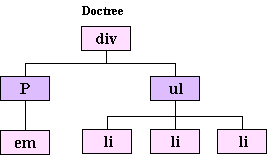
<p>That markup would be turned into a tree structure essentially like
this:</p>

<p><img src="/doctree.gif" width="267" height="155" alt="Image of doctree" /></p>

<p>As you can see, the div contains two other elements: a paragraph,
which itself contains an emphasis element, and an unordered list that
contains three list item elements.</p>

<p>A great way to think about the document tree is to imagine it as a
family tree, a concept that you&#8217;re probably more familiar with.
The document tree even uses the same terminology. If an element
contains another element, that first element is said to be the parent
and the second the <em>child</em>. Likewise, if two elements have the
same parent they are said to be <em>siblings</em>. Elements can have
<em>descendants</em> farther down in the tree and <em>ancestors</em>
higher up.</p>

<p>You&#8217;ve probably heard the phrase, &#8220;separation of style and
structure,&#8221; tossed about a great deal. Well, the document tree
and all its relationships are the &#8220;structure&#8221; part of that
concept, and the declarations in the style sheet are the
&#8220;style.&#8221; Selectors are the link that allows you to connect
the two while keeping them separate.</p>

<p>Selectors are essentially just patterns. The browser takes those
patterns and looks for elements in the document tree that match them.
They can be very simple patterns, like <code>h1</code> or
<code>p</code>, or they can be somewhat more complex requiring specific
relationships between multiple elements in order to match. For example:</p>

<pre><code>div#main &gt; h3.product + p:first-line
</code></pre>

<p>Incidentally, if you are already able to decipher that you probably don&#8217;t need
to be reading this article. If not, don&#8217;t worry about it; you should be able to
figure it out by the time we&#8217;re through.</p>

<p>Now that we&#8217;ve gotten the basic theory out of the way, we&#8217;re ready to examine
the components used to build selectors. There are two basic categories of
selectors: simple selectors and compound or contextual selectors, which are made
up of simple selectors joined by operators called combinators.</p>

<h3>Simple Selectors</h3>

<p>Simple selectors are patterns that only examine single elements in the
document tree at a time. The recipe for building simple selectors is,
strangely enough, rather simple:</p>

<ol>
<li><strong>Start with one of:</strong>
<ul>
<li>Universal selector</li>
<li>Type selector</li>
</ul></li>
<li><strong>Add any number of:</strong>
<ul>
<li>Attribute (or class) selectors</li>
<li>ID selectors</li>
<li>Pseudo-class selectors</li>
</ul></li>
<li><strong>Optionally, add one:</strong>
<ul>
<li>Pseudo-element selector</li>
</ul></li>
</ol>

<p>Of course, that recipe isn&#8217;t terribly helpful if you don&#8217;t
know what the various ingredients are, so let&#8217;s go over those
next.</p>

<h4>Universal Selector</h4>

<p>The universal selector is the most generic of all the selectors. It is
represented by an asterisk (<code>*</code>) and matches any element in the document
tree. If there are any other components in the simple selector you can
leave off the asterisk. For example, these rule sets would match
exactly the same elements:</p>

<pre><code>*.footnote { font-size: smaller; }
.footnote { font-size: smaller; }
</code></pre>

<h4>Type Selectors</h4>

<p>A type selector can be the name of any element from the particular
markup language your document uses, and matches every instance of that
element in the document tree. This rule set would match every list
item in the document:</p>

<pre><code>li { color: blue; }
</code></pre>

<h4>Attribute Selectors</h4>

<p>Attribute selectors allow you to select elements based on the presence
or value of their attributes. They are written using a comparison
statement enclosed in square brackets (<code>[]</code>). CSS 2 provides four
different comparisons for attribute selectors:</p>

<ul>
<li><p><code>[attribute]</code></p>

<p>Match elements that have attribute set at all.</p></li>
<li><p><code>[attribute="value"]</code></p>

<p>Match elements where attribute&#8217;s value is exactly &#8220;value&#8221;.</p></li>
<li><p><code>[attribute~="value"]</code></p>

<p>Match elements where attribute&#8217;s value is a space-separated list containing &#8220;value&#8221;.</p></li>
<li><p><code>[attribute|="value"]</code></p>

<p>Match elements where attribute&#8217;s value is a hyphen-separated
list starting with &#8220;value&#8221;. This is used predominantly
(if not almost exclusively) with the lang attribute, which is a
hyphen separated list of language codes. E.g., the selector
<code>[lang|="en"]</code> would match both of these paragraphs, while
the selector <code>[lang|="en-US"]</code> would match only the
second:</p>

<pre><code>&lt;p lang="en-UK"&gt;He looked down and realised that
he was wearing two different colour socks and his pyjama
shirt.&lt;/p&gt;
&lt;p lang="en-US"&gt;He looked down and realized that
he was wearing two different color socks and his pajama
shirt.&lt;/p&gt;
</code></pre></li>
</ul>

<p>So, for example, if you wanted to style all links in a document, but
not the named anchors, you might write a selector that would match any
<code>a</code> element with an <code>href</code> attribute:</p>

<pre><code>a[href] { font-weight: bold; }
</code></pre>

<p>Or, if you wanted to style the label of a particular form field, you
might write a selector that would match the <code>label</code> element with the ID
of the field as its <code>for</code> attribute value:</p>

<pre><code>label[for="namefield"] { font-weight: bold; }
</code></pre>

<h4>Class Selectors</h4>

<p>Class selectors are represented by a period followed by the class name
you want to match. This rule set would match any element with a class
attribute containing the term &#8220;byline&#8221;</p>

<pre><code>.byline { font-style: italic; }
</code></pre>

<p>For example, that rule set would match both of these elements:</p>

<pre><code>&lt;div class="byline"&gt; ... &lt;/div&gt;
&lt;div class="feature byline external"&gt; ... &lt;/div&gt;
</code></pre>

<p>Class selectors are nothing more than an attribute selector shortcut
for authors styling HTML documents. That is, these two selectors mean
the exact same thing when applied to an HTML document:</p>

<pre><code>.byline    
[class~="byline"]
</code></pre>

<h4>ID Selectors</h4>

<p>You&#8217;d probably never guess from their name, but ID selectors allow you to
select unique elements from the document tree using the value of their
<code>id</code> attributes. They are made by adding a hash or pound sign (<code>#</code>) to the
beginning of the ID you wish to select:</p>

<pre><code>#footnotes
</code></pre>

<p>ID selectors are somewhat similar to class selectors in that they,
too, can be represented as attribute selectors that will select the
exact same elements from the document tree. This attribute selector,
for example, will find the same elements as the previous ID selector:</p>

<pre><code>[id="footnotes"]
</code></pre>

<p>However, there is one very important difference: CSS grants ID
selectors a higher level of specificity than attribute selectors. I
will explain this in much more detail in my next article, but in a
nutshell that means that if you specified both of the rule sets below
in the style sheet(s) for a document, the <code>font-style</code> declaration from
the rule set with the ID selector would always override the one from
the attribute selector rule set.</p>

<pre><code>#footnotes { font-style: normal; }
[id="footnotes"] { font-style: italic; }
</code></pre>

<p>This would be true regardless of the order they were specified in, and
the text in the element with the ID &#8220;footnotes&#8221; would appear
in normal text instead of italics.</p>

<h4>Pseudo-class Selectors</h4>

<p>CSS 2 provides seven different pseudo-class selectors. They work by
matching certain characteristics of elements in the document tree that
aren&#8217;t explicitly encoded in their names or attribute values. The
seven pseudo-classes are as follows:</p>

<ul>
<li><p><code>:link</code></p>

<p>Match links in the document that are unvisited.</p></li>
<li><p><code>:visited</code></p>

<p>Match links in the document that have been visited.</p></li>
<li><p><code>:hover</code></p>

<p>Match an element pointed to but not activated by the user (e.g.,
mousing over a link).</p></li>
<li><p><code>:active</code></p>

<p>Match an element being activated by the user (e.g., clicking on a
button).</p></li>
<li><p><code>:focus</code></p>

<p>Match the element that has the browser&rsquol;s focus (e.g., a form
field that&#8217;s accepting input).</p></li>
<li><p><code>:first-child</code></p>

<p>Match an element if it is the first child of its parent. For
example, the selector <code>p:first-child</code> would match every paragraph in
a document that was the first child of its parent. People sometimes
incorrectly interpret this to mean the first paragraph in the
parent element. To illustrate, the previous selector would match
the first paragraph below, but not the second:</p>

<pre><code>&lt;div&gt;
    &lt;p&gt;This is a paragraph.&lt;/p&gt;
&lt;/div&gt;
&lt;div&gt;
    &lt;h1&gt;This is a heading&lt;/h1&gt;
    &lt;p&gt;This is another paragraph.&lt;/p&gt;    
&lt;/div&gt;
</code></pre></li>
<li><p><code>:lang()</code></p>

<p>Match elements based on the language that the document or portion
of the document is specified to be in. The desired language code is
given as an argument to the selector, for example,
<code>:lang(en)</code> would match elements in English,
<code>:lang(de)</code> in German, etc.</p></li>
</ul>

<h4>Pseudo-element Selectors</h4>

<p>In much the same way that pseudo-class selectors allow you to select
groupings of elements based on characteristics beyond those encoded in
the document, pseudo-element selectors allow you to select elements
that aren&#8217;t explicitly defined in the document tree. There are
four such pseudo-elements defined by CSS 2:</p>

<ul>
<li><p><code>:first-letter</code></p>

<p>Match the first letter of an element.</p></li>
<li><p><code>:first-line</code></p>

<p>Match the first line of content in an element (as rendered, not as
in the source).</p></li>
<li><p><code>:before</code></p>

<p>Used to insert generated content before the matched element&#8217;s
actual content.</p></li>
<li><p><code>:after</code></p>

<p>Used to insert generated content after the matched element&#8217;s
actual content.</p></li>
</ul>

<p>The <code>:first-letter</code> and <code>:first-line</code> pseudo-elements
are pretty self-explanatory, but <code>:before</code> and <code>:after</code>
might seem a little odd. It might help to think of them as creating
pointers in the document, similar to the way clicking the mouse in a
line of text in a word processor moves the cursor there so you can
insert text. Here&#8217;s a simple example of <code>:before</code> and
<code>:after</code> pseudo-elements at work:</p>

<pre><code>p:before { content: "["; font-weight: bold; }
p:after { content: "]"; font-weight: bold; }`
</code></pre>

<p>Applying those rule sets to markup like this:</p>

<pre><code>&lt;p&gt;This is a paragraph.&lt;/p&gt;
&lt;p&gt;This is another paragraph.&lt;/p&gt;
</code></pre>

<p>Might yield something like this when rendered:</p>

<pre><code>[This is a paragraph.]

[This is another paragraph.]
</code></pre>

<p>One thing to note about pseudo-element selectors that will be important
when we move on to contextual selectors: only one pseudo-element selector
is allowed in a contextual selector, and it must be at the end of the last
simple selector in the chain.</p>

<h4>Putting it all Together</h4>

<p>Now you&#8217;ve seen all the available components for building simple
selectors in CSS 2. Combining them is just a matter of concatenating
the different components you need with no spaces in between.
Let&#8217;s work through a couple of examples to see how we can make use
of all this.</p>

<p>Let&#8217;s say we wanted to style the first line of any paragraph with
a class of &#8220;excerpt&#8221; when it&#8217;s the first child of its
parent. Examining that, we can see that we&#8217;re going to need a type
selector (<code>p</code>), a class selector (<code>.excerpt</code>), a
pseudo-class selector (<code>:first-child</code>), and a pseudo-element
selector (<code>:first-line</code>). All that&#8217;s left now is putting
them together according to the instructions in the simple selector
recipe:</p>

<pre><code>p.excerpt:first-child:first-line
</code></pre>

<p>We know the type selector has to be first and the pseudo-element must
be last, but the class and pseudo-class selectors may appear in any
order. So, it would be just as correct to have written it this way
instead:</p>

<pre><code>p:first-child.excerpt:first-line
</code></pre>

<p>Now let&#8217;s try another. How about a selector to match any element
that has a title attribute while the user is hovering over it? Again,
breaking it down we&#8217;re going to need a universal selector to
select any element (<code>*</code>), an attribute selector
(<code>[title]</code>), and a pseudo-class selector (<code>:hover</code>).
Slap &lsquo;em together and what do you get?</p>

<pre><code>*[title]:hover
</code></pre>

<p>Again, the attribute and pseudo-class selectors could be specified in
whatever order you like. Also, since the universal selector is not the
only component in use we could omit the asterisk:</p>

<pre><code>[title]:hover
</code></pre>

<p>Simple selectors can only get you so far, however. Before long you
will find you want to be able to match patterns of multiple elements,
and this is where contextual selectors come in.</p>

<h3>Contextual Selectors</h3>

<p>A contextual selector is one that selects an element based on its
context (No duh, huh?), that is, its relationship with other elements
in the document tree. As I explained earlier, the way you build a
contextual selector is by joining multiple simple selectors with
operators called combinators. CSS 2 provides three different
combinators: decendant, child, and adjacent sibling.</p>

<h4>Descendant Combinator</h4>

<p>The decendant combinator is simply any whitespace, such as some number
of space characters, and indicates that you want to select elements
that match the second simple selector when they are contained inside
of an element that matches the first simple selector. It doesn&#8217;t
matter how deeply the second element is nested inside the
first&mdash;it could be a direct child or a
great-great-great-great-grandchild of the first element.</p>

<p>Here is a couple of examples and what they mean:</p>

<ul>
<li><p><code>div.sidebar p</code></p>

<p>Select any paragraph that is a descendant of a div with a class of
&#8220;sidebar&#8221;.</p>

<p>This selector would match both paragraphs in this markup:</p>

<pre><code>&lt;div class="sidebar"&gt;
    &lt;p&gt;This is a paragraph&lt;/p&gt;
    &lt;div&gt;
        &lt;p&gt;This is another paragraph.&lt;/p&gt;    
    &lt;/div&gt;
&lt;/div&gt;
</code></pre></li>
<li><p><code>#maincontent blockquote p:first-child:first-line</code></p>

<p>Select the first line of any paragraph that is the first child of
its parent and is a descendant of a block quote, which itself is
the descendant of any element with the ID
&#8220;maincontent&#8221;.</p>

<p>This selector would match the first lines of both paragraphs in
this markup:</p>

<pre><code>&lt;div id="maincontent"&gt;
    &lt;blockquote&gt;
        &lt;p&gt;This is a paragraph.&lt;/p&gt;
        &lt;div&gt;
            &lt;p&gt;This is another paragraph.&lt;/p&gt;    
        &lt;/div&gt;
    &lt;/blockquote&gt;
&lt;/div&gt;
</code></pre></li>
</ul>

<h4>Child Combinator</h4>

<p>The child combinator is the greater-than symbol or right angle bracket
(<code>&gt;</code>). Using it to combine two simple selectors means that
elements matching the second simple selector should be selected when they
are immediate children of an element matching the first.</p>

<p>Let&#8217;s take a look at some examples using the child combinator:</p>

<ul>
<li><p><code>div.sidebar &gt; p</code></p>

<p>Select any paragraph that is an immediate child of a div with a class of &#8220;sidebar&#8221;.</p>

<p>This selector would match only the first paragraph in this markup:</p>

<pre><code>&lt;div class="sidebar"&gt;
    &lt;p&gt;This is a paragraph&lt;/p&gt;
    &lt;div&gt;
        &lt;p&gt;This is another paragraph.&lt;/p&gt;
    &lt;/div&gt;
&lt;/div&gt;
</code></pre></li>
<li><p><code>#maincontent blockquote &gt; p:first-child:first-line</code></p>

<p>Select the first line of any paragraph that is the first child of a
block quote, which itself is the descendant of any element with the ID
&#8220;maincontent&#8221;.</p>

<p>This selector would match the first line of the first paragraph in this markup:</p>

<pre><code>&lt;div id="maincontent"&gt;
    &lt;blockquote&gt;
        &lt;p&gt;This is a paragraph.&lt;/p&gt;
        &lt;div&gt;
            &lt;p&gt;This is another paragraph.&lt;/p&gt;
        &lt;/div&gt;
    &lt;/blockquote&gt;
&lt;/div&gt;
</code></pre></li>
</ul>

<h4>Adjacent Sibling Combinator</h4>

<p>The last combinator is the adjacent sibling combinator. It&#8217;s
represented by the plus character (+) and when used to combine two
simple selectors it selects elements that match the second simple
selector and are immediately preceded by an element that matches the
first simple selector and has the same parent as the second.</p>

<p>Here&#8217;s an example:</p>

<ul>
<li><p><code>div.sidebar p + p</code></p>

<p>Select any paragraph that is immediately preceded by a sibling
paragraph that is a descendant of a div with a class of
&#8220;sidebar&#8221;.</p>

<p>This selector would match only the second paragraph in this
markup:</p>

<pre><code>&lt;div class="sidebar"&gt;
    &lt;p&gt;This is a paragraph&lt;/p&gt;
    &lt;p&gt;This is another paragraph.&lt;/p&gt;
&lt;/div&gt;
</code></pre></li>
</ul>

<h3>Grouping Selectors</h3>

<p>Frequently you will find that you want to apply the same rules to
elements matched by different selectors. In order to keep from having
to specify the same rule sets over and over, CSS allows you to group
selectors for use with a single rule set by joining them with commas.
For example, if you wanted to style all six levels of headings with a
particular font, instead of having to do this:</p>

<pre><code>h1 { font-family: "My Snappy Font"; }
h2 { font-family: "My Snappy Font"; }
h3 { font-family: "My Snappy Font"; }
h4 { font-family: "My Snappy Font"; }
h5 { font-family: "My Snappy Font"; }
h6 { font-family: "My Snappy Font"; }
</code></pre>

<p>You may simply write it this way:</p>

<pre><code>h1, h2, h3, h4, h5, h6 { font-family: "My Snappy Font"; }
</code></pre>

<p>One extremely common mistake when grouping selectors is to write
something like this:</p>

<pre><code>div#maincontent ul, ol
</code></pre>

<p>When what is really meant is this:</p>

<pre><code>div#maincontent ul, div#maincontent ol
</code></pre>

<p>When grouping selectors it is very important to realize that the comma
starts an entirely new selector from the beginning. That is, the first
selector would select any unordered lists that are inside of a div
with the ID &#8220;maincontent&#8221; and any ordered lists
<strong>anywhere in the document</strong>. The second selector, on the
other hand, would select any ordered or unordered lists that are
inside of a div with the ID &#8220;maincontent&#8221;.</p>

<p>To visualize this, it helps to picture the comma as a newline &#8212; to
view each grouped selector on its own. Looking at the first selector
this way you&#8217;d see much more clearly how the <code>ol</code> is off by
itself:</p>

<pre><code>div#maincontent ul
ol
</code></pre>

<h3>Wrapping Up</h3>

<p>By now, you should have a pretty good handle on the components for
building selectors in CSS 2, and the theory behind them. You should be
fairly comfortable breaking down existing selectors to understand
their meaning, and building up your own layer at a time. To test your
skills take another look at that selector I mentioned back at the
beginning of the article and see if you can describe what it would
select:</p>

<pre><code>div#main &gt; h3.product + p:first-line
</code></pre>

<p>If you get stuck, or if you just want to check yourself, try running
it through the Opal Group&#8217;s <a
href="http://gallery.theopalgroup.com/selectoracle/">SelectORacle</a>.
It&#8217;s a very useful tool that converts CSS selectors into
almost plain-English descriptions of what they select.</p>

<p>Be looking for the second piece in this series that will tackle the
cascade, explaining how rules are sorted and applied based on their
origin and relative weight, or specificity. Also, if you&#8217;re
interested in looking ahead to where selectors are going, you might
want to check out the <a href="http://www.w3.org/TR/css3-selectors/">CSS
3 Selectors Module</a>, which is currently a Candidate
Recommendation. CSS 3 selectors change some things, but for the most
part build on top of what you now know about CSS 2 selectors.</p>
]]>
<![CDATA[<h3>What is a selector?</h3>

<p>Selectors are one half of CSS&#8217;s bread-and-butter component: the
rule set. When a browser applies a rule set from a style sheet to a
document, the selector tells the browser which elements in that
document the rule set should act on. Its counterpart, the
declaration block, contains the instructions that are to be carried
out. Let&#8217;s take a look at a simple example:</p>

<pre><code>h1 { font-style: italic; }
</code></pre>

<p>The selector in this rule set is <code>h1</code>, and the declaration
block contains a single declaration (<code>font-style: italic;</code>), itself composed of a property
(<code>font-style</code>) and a value (<code>italic</code>). Together
they tell the browser to display any first-level headers in the
document in italics.</p>

<h3>How do selectors work?</h3>

<p>In order to really understand how selectors do what they do we need to
take a slight side trip into how browsers actually deal with markup.
When a browser interprets a document marked up with a language such as
HTML, XHTML, or XML, it parses the data that document contains into a
tree structure called, appropriately enough, the document tree, where
the branches of the tree are created by the relationships between the
different elements in the document&mdash;which elements contain which
other elements. This is actually easier to explain visually, so
let&#8217;s examine a markup snippet:</p>

<pre><code>&lt;div&gt;
    &lt;p&gt;This is a &lt;em&gt;paragraph&lt;/em&gt;&lt;/p&gt;

    &lt;ul&gt;
        &lt;li&gt;Item One&lt;/li&gt;
        &lt;li&gt;Item Two&lt;/li&gt;
        &lt;li&gt;Item Three&lt;/li&gt;
    &lt;/ul&gt;
&lt;/div&gt;
</code></pre>

<p>That markup would be turned into a tree structure essentially like
this:</p>

<p><img src="/doctree.gif" width="267" height="155" alt="Image of doctree" /></p>

<p>As you can see, the div contains two other elements: a paragraph,
which itself contains an emphasis element, and an unordered list that
contains three list item elements.</p>

<p>A great way to think about the document tree is to imagine it as a
family tree, a concept that you&#8217;re probably more familiar with.
The document tree even uses the same terminology. If an element
contains another element, that first element is said to be the parent
and the second the <em>child</em>. Likewise, if two elements have the
same parent they are said to be <em>siblings</em>. Elements can have
<em>descendants</em> farther down in the tree and <em>ancestors</em>
higher up.</p>

<p>You&#8217;ve probably heard the phrase, &#8220;separation of style and
structure,&#8221; tossed about a great deal. Well, the document tree
and all its relationships are the &#8220;structure&#8221; part of that
concept, and the declarations in the style sheet are the
&#8220;style.&#8221; Selectors are the link that allows you to connect
the two while keeping them separate.</p>

<p>Selectors are essentially just patterns. The browser takes those
patterns and looks for elements in the document tree that match them.
They can be very simple patterns, like <code>h1</code> or
<code>p</code>, or they can be somewhat more complex requiring specific
relationships between multiple elements in order to match. For example:</p>

<pre><code>div#main &gt; h3.product + p:first-line
</code></pre>

<p>Incidentally, if you are already able to decipher that you probably don&#8217;t need
to be reading this article. If not, don&#8217;t worry about it; you should be able to
figure it out by the time we&#8217;re through.</p>

<p>Now that we&#8217;ve gotten the basic theory out of the way, we&#8217;re ready to examine
the components used to build selectors. There are two basic categories of
selectors: simple selectors and compound or contextual selectors, which are made
up of simple selectors joined by operators called combinators.</p>

<h3>Simple Selectors</h3>

<p>Simple selectors are patterns that only examine single elements in the
document tree at a time. The recipe for building simple selectors is,
strangely enough, rather simple:</p>

<ol>
<li><strong>Start with one of:</strong>
<ul>
<li>Universal selector</li>
<li>Type selector</li>
</ul></li>
<li><strong>Add any number of:</strong>
<ul>
<li>Attribute (or class) selectors</li>
<li>ID selectors</li>
<li>Pseudo-class selectors</li>
</ul></li>
<li><strong>Optionally, add one:</strong>
<ul>
<li>Pseudo-element selector</li>
</ul></li>
</ol>

<p>Of course, that recipe isn&#8217;t terribly helpful if you don&#8217;t
know what the various ingredients are, so let&#8217;s go over those
next.</p>

<h4>Universal Selector</h4>

<p>The universal selector is the most generic of all the selectors. It is
represented by an asterisk (<code>*</code>) and matches any element in the document
tree. If there are any other components in the simple selector you can
leave off the asterisk. For example, these rule sets would match
exactly the same elements:</p>

<pre><code>*.footnote { font-size: smaller; }
.footnote { font-size: smaller; }
</code></pre>

<h4>Type Selectors</h4>

<p>A type selector can be the name of any element from the particular
markup language your document uses, and matches every instance of that
element in the document tree. This rule set would match every list
item in the document:</p>

<pre><code>li { color: blue; }
</code></pre>

<h4>Attribute Selectors</h4>

<p>Attribute selectors allow you to select elements based on the presence
or value of their attributes. They are written using a comparison
statement enclosed in square brackets (<code>[]</code>). CSS 2 provides four
different comparisons for attribute selectors:</p>

<ul>
<li><p><code>[attribute]</code></p>

<p>Match elements that have attribute set at all.</p></li>
<li><p><code>[attribute="value"]</code></p>

<p>Match elements where attribute&#8217;s value is exactly &#8220;value&#8221;.</p></li>
<li><p><code>[attribute~="value"]</code></p>

<p>Match elements where attribute&#8217;s value is a space-separated list containing &#8220;value&#8221;.</p></li>
<li><p><code>[attribute|="value"]</code></p>

<p>Match elements where attribute&#8217;s value is a hyphen-separated
list starting with &#8220;value&#8221;. This is used predominantly
(if not almost exclusively) with the lang attribute, which is a
hyphen separated list of language codes. E.g., the selector
<code>[lang|="en"]</code> would match both of these paragraphs, while
the selector <code>[lang|="en-US"]</code> would match only the
second:</p>

<pre><code>&lt;p lang="en-UK"&gt;He looked down and realised that
he was wearing two different colour socks and his pyjama
shirt.&lt;/p&gt;
&lt;p lang="en-US"&gt;He looked down and realized that
he was wearing two different color socks and his pajama
shirt.&lt;/p&gt;
</code></pre></li>
</ul>

<p>So, for example, if you wanted to style all links in a document, but
not the named anchors, you might write a selector that would match any
<code>a</code> element with an <code>href</code> attribute:</p>

<pre><code>a[href] { font-weight: bold; }
</code></pre>

<p>Or, if you wanted to style the label of a particular form field, you
might write a selector that would match the <code>label</code> element with the ID
of the field as its <code>for</code> attribute value:</p>

<pre><code>label[for="namefield"] { font-weight: bold; }
</code></pre>

<h4>Class Selectors</h4>

<p>Class selectors are represented by a period followed by the class name
you want to match. This rule set would match any element with a class
attribute containing the term &#8220;byline&#8221;</p>

<pre><code>.byline { font-style: italic; }
</code></pre>

<p>For example, that rule set would match both of these elements:</p>

<pre><code>&lt;div class="byline"&gt; ... &lt;/div&gt;
&lt;div class="feature byline external"&gt; ... &lt;/div&gt;
</code></pre>

<p>Class selectors are nothing more than an attribute selector shortcut
for authors styling HTML documents. That is, these two selectors mean
the exact same thing when applied to an HTML document:</p>

<pre><code>.byline    
[class~="byline"]
</code></pre>

<h4>ID Selectors</h4>

<p>You&#8217;d probably never guess from their name, but ID selectors allow you to
select unique elements from the document tree using the value of their
<code>id</code> attributes. They are made by adding a hash or pound sign (<code>#</code>) to the
beginning of the ID you wish to select:</p>

<pre><code>#footnotes
</code></pre>

<p>ID selectors are somewhat similar to class selectors in that they,
too, can be represented as attribute selectors that will select the
exact same elements from the document tree. This attribute selector,
for example, will find the same elements as the previous ID selector:</p>

<pre><code>[id="footnotes"]
</code></pre>

<p>However, there is one very important difference: CSS grants ID
selectors a higher level of specificity than attribute selectors. I
will explain this in much more detail in my next article, but in a
nutshell that means that if you specified both of the rule sets below
in the style sheet(s) for a document, the <code>font-style</code> declaration from
the rule set with the ID selector would always override the one from
the attribute selector rule set.</p>

<pre><code>#footnotes { font-style: normal; }
[id="footnotes"] { font-style: italic; }
</code></pre>

<p>This would be true regardless of the order they were specified in, and
the text in the element with the ID &#8220;footnotes&#8221; would appear
in normal text instead of italics.</p>

<h4>Pseudo-class Selectors</h4>

<p>CSS 2 provides seven different pseudo-class selectors. They work by
matching certain characteristics of elements in the document tree that
aren&#8217;t explicitly encoded in their names or attribute values. The
seven pseudo-classes are as follows:</p>

<ul>
<li><p><code>:link</code></p>

<p>Match links in the document that are unvisited.</p></li>
<li><p><code>:visited</code></p>

<p>Match links in the document that have been visited.</p></li>
<li><p><code>:hover</code></p>

<p>Match an element pointed to but not activated by the user (e.g.,
mousing over a link).</p></li>
<li><p><code>:active</code></p>

<p>Match an element being activated by the user (e.g., clicking on a
button).</p></li>
<li><p><code>:focus</code></p>

<p>Match the element that has the browser&rsquol;s focus (e.g., a form
field that&#8217;s accepting input).</p></li>
<li><p><code>:first-child</code></p>

<p>Match an element if it is the first child of its parent. For
example, the selector <code>p:first-child</code> would match every paragraph in
a document that was the first child of its parent. People sometimes
incorrectly interpret this to mean the first paragraph in the
parent element. To illustrate, the previous selector would match
the first paragraph below, but not the second:</p>

<pre><code>&lt;div&gt;
    &lt;p&gt;This is a paragraph.&lt;/p&gt;
&lt;/div&gt;
&lt;div&gt;
    &lt;h1&gt;This is a heading&lt;/h1&gt;
    &lt;p&gt;This is another paragraph.&lt;/p&gt;    
&lt;/div&gt;
</code></pre></li>
<li><p><code>:lang()</code></p>

<p>Match elements based on the language that the document or portion
of the document is specified to be in. The desired language code is
given as an argument to the selector, for example,
<code>:lang(en)</code> would match elements in English,
<code>:lang(de)</code> in German, etc.</p></li>
</ul>

<h4>Pseudo-element Selectors</h4>

<p>In much the same way that pseudo-class selectors allow you to select
groupings of elements based on characteristics beyond those encoded in
the document, pseudo-element selectors allow you to select elements
that aren&#8217;t explicitly defined in the document tree. There are
four such pseudo-elements defined by CSS 2:</p>

<ul>
<li><p><code>:first-letter</code></p>

<p>Match the first letter of an element.</p></li>
<li><p><code>:first-line</code></p>

<p>Match the first line of content in an element (as rendered, not as
in the source).</p></li>
<li><p><code>:before</code></p>

<p>Used to insert generated content before the matched element&#8217;s
actual content.</p></li>
<li><p><code>:after</code></p>

<p>Used to insert generated content after the matched element&#8217;s
actual content.</p></li>
</ul>

<p>The <code>:first-letter</code> and <code>:first-line</code> pseudo-elements
are pretty self-explanatory, but <code>:before</code> and <code>:after</code>
might seem a little odd. It might help to think of them as creating
pointers in the document, similar to the way clicking the mouse in a
line of text in a word processor moves the cursor there so you can
insert text. Here&#8217;s a simple example of <code>:before</code> and
<code>:after</code> pseudo-elements at work:</p>

<pre><code>p:before { content: "["; font-weight: bold; }
p:after { content: "]"; font-weight: bold; }`
</code></pre>

<p>Applying those rule sets to markup like this:</p>

<pre><code>&lt;p&gt;This is a paragraph.&lt;/p&gt;
&lt;p&gt;This is another paragraph.&lt;/p&gt;
</code></pre>

<p>Might yield something like this when rendered:</p>

<pre><code>[This is a paragraph.]

[This is another paragraph.]
</code></pre>

<p>One thing to note about pseudo-element selectors that will be important
when we move on to contextual selectors: only one pseudo-element selector
is allowed in a contextual selector, and it must be at the end of the last
simple selector in the chain.</p>

<h4>Putting it all Together</h4>

<p>Now you&#8217;ve seen all the available components for building simple
selectors in CSS 2. Combining them is just a matter of concatenating
the different components you need with no spaces in between.
Let&#8217;s work through a couple of examples to see how we can make use
of all this.</p>

<p>Let&#8217;s say we wanted to style the first line of any paragraph with
a class of &#8220;excerpt&#8221; when it&#8217;s the first child of its
parent. Examining that, we can see that we&#8217;re going to need a type
selector (<code>p</code>), a class selector (<code>.excerpt</code>), a
pseudo-class selector (<code>:first-child</code>), and a pseudo-element
selector (<code>:first-line</code>). All that&#8217;s left now is putting
them together according to the instructions in the simple selector
recipe:</p>

<pre><code>p.excerpt:first-child:first-line
</code></pre>

<p>We know the type selector has to be first and the pseudo-element must
be last, but the class and pseudo-class selectors may appear in any
order. So, it would be just as correct to have written it this way
instead:</p>

<pre><code>p:first-child.excerpt:first-line
</code></pre>

<p>Now let&#8217;s try another. How about a selector to match any element
that has a title attribute while the user is hovering over it? Again,
breaking it down we&#8217;re going to need a universal selector to
select any element (<code>*</code>), an attribute selector
(<code>[title]</code>), and a pseudo-class selector (<code>:hover</code>).
Slap &lsquo;em together and what do you get?</p>

<pre><code>*[title]:hover
</code></pre>

<p>Again, the attribute and pseudo-class selectors could be specified in
whatever order you like. Also, since the universal selector is not the
only component in use we could omit the asterisk:</p>

<pre><code>[title]:hover
</code></pre>

<p>Simple selectors can only get you so far, however. Before long you
will find you want to be able to match patterns of multiple elements,
and this is where contextual selectors come in.</p>

<h3>Contextual Selectors</h3>

<p>A contextual selector is one that selects an element based on its
context (No duh, huh?), that is, its relationship with other elements
in the document tree. As I explained earlier, the way you build a
contextual selector is by joining multiple simple selectors with
operators called combinators. CSS 2 provides three different
combinators: decendant, child, and adjacent sibling.</p>

<h4>Descendant Combinator</h4>

<p>The decendant combinator is simply any whitespace, such as some number
of space characters, and indicates that you want to select elements
that match the second simple selector when they are contained inside
of an element that matches the first simple selector. It doesn&#8217;t
matter how deeply the second element is nested inside the
first&mdash;it could be a direct child or a
great-great-great-great-grandchild of the first element.</p>

<p>Here is a couple of examples and what they mean:</p>

<ul>
<li><p><code>div.sidebar p</code></p>

<p>Select any paragraph that is a descendant of a div with a class of
&#8220;sidebar&#8221;.</p>

<p>This selector would match both paragraphs in this markup:</p>

<pre><code>&lt;div class="sidebar"&gt;
    &lt;p&gt;This is a paragraph&lt;/p&gt;
    &lt;div&gt;
        &lt;p&gt;This is another paragraph.&lt;/p&gt;    
    &lt;/div&gt;
&lt;/div&gt;
</code></pre></li>
<li><p><code>#maincontent blockquote p:first-child:first-line</code></p>

<p>Select the first line of any paragraph that is the first child of
its parent and is a descendant of a block quote, which itself is
the descendant of any element with the ID
&#8220;maincontent&#8221;.</p>

<p>This selector would match the first lines of both paragraphs in
this markup:</p>

<pre><code>&lt;div id="maincontent"&gt;
    &lt;blockquote&gt;
        &lt;p&gt;This is a paragraph.&lt;/p&gt;
        &lt;div&gt;
            &lt;p&gt;This is another paragraph.&lt;/p&gt;    
        &lt;/div&gt;
    &lt;/blockquote&gt;
&lt;/div&gt;
</code></pre></li>
</ul>

<h4>Child Combinator</h4>

<p>The child combinator is the greater-than symbol or right angle bracket
(<code>&gt;</code>). Using it to combine two simple selectors means that
elements matching the second simple selector should be selected when they
are immediate children of an element matching the first.</p>

<p>Let&#8217;s take a look at some examples using the child combinator:</p>

<ul>
<li><p><code>div.sidebar &gt; p</code></p>

<p>Select any paragraph that is an immediate child of a div with a class of &#8220;sidebar&#8221;.</p>

<p>This selector would match only the first paragraph in this markup:</p>

<pre><code>&lt;div class="sidebar"&gt;
    &lt;p&gt;This is a paragraph&lt;/p&gt;
    &lt;div&gt;
        &lt;p&gt;This is another paragraph.&lt;/p&gt;
    &lt;/div&gt;
&lt;/div&gt;
</code></pre></li>
<li><p><code>#maincontent blockquote &gt; p:first-child:first-line</code></p>

<p>Select the first line of any paragraph that is the first child of a
block quote, which itself is the descendant of any element with the ID
&#8220;maincontent&#8221;.</p>

<p>This selector would match the first line of the first paragraph in this markup:</p>

<pre><code>&lt;div id="maincontent"&gt;
    &lt;blockquote&gt;
        &lt;p&gt;This is a paragraph.&lt;/p&gt;
        &lt;div&gt;
            &lt;p&gt;This is another paragraph.&lt;/p&gt;
        &lt;/div&gt;
    &lt;/blockquote&gt;
&lt;/div&gt;
</code></pre></li>
</ul>

<h4>Adjacent Sibling Combinator</h4>

<p>The last combinator is the adjacent sibling combinator. It&#8217;s
represented by the plus character (+) and when used to combine two
simple selectors it selects elements that match the second simple
selector and are immediately preceded by an element that matches the
first simple selector and has the same parent as the second.</p>

<p>Here&#8217;s an example:</p>

<ul>
<li><p><code>div.sidebar p + p</code></p>

<p>Select any paragraph that is immediately preceded by a sibling
paragraph that is a descendant of a div with a class of
&#8220;sidebar&#8221;.</p>

<p>This selector would match only the second paragraph in this
markup:</p>

<pre><code>&lt;div class="sidebar"&gt;
    &lt;p&gt;This is a paragraph&lt;/p&gt;
    &lt;p&gt;This is another paragraph.&lt;/p&gt;
&lt;/div&gt;
</code></pre></li>
</ul>

<h3>Grouping Selectors</h3>

<p>Frequently you will find that you want to apply the same rules to
elements matched by different selectors. In order to keep from having
to specify the same rule sets over and over, CSS allows you to group
selectors for use with a single rule set by joining them with commas.
For example, if you wanted to style all six levels of headings with a
particular font, instead of having to do this:</p>

<pre><code>h1 { font-family: "My Snappy Font"; }
h2 { font-family: "My Snappy Font"; }
h3 { font-family: "My Snappy Font"; }
h4 { font-family: "My Snappy Font"; }
h5 { font-family: "My Snappy Font"; }
h6 { font-family: "My Snappy Font"; }
</code></pre>

<p>You may simply write it this way:</p>

<pre><code>h1, h2, h3, h4, h5, h6 { font-family: "My Snappy Font"; }
</code></pre>

<p>One extremely common mistake when grouping selectors is to write
something like this:</p>

<pre><code>div#maincontent ul, ol
</code></pre>

<p>When what is really meant is this:</p>

<pre><code>div#maincontent ul, div#maincontent ol
</code></pre>

<p>When grouping selectors it is very important to realize that the comma
starts an entirely new selector from the beginning. That is, the first
selector would select any unordered lists that are inside of a div
with the ID &#8220;maincontent&#8221; and any ordered lists
<strong>anywhere in the document</strong>. The second selector, on the
other hand, would select any ordered or unordered lists that are
inside of a div with the ID &#8220;maincontent&#8221;.</p>

<p>To visualize this, it helps to picture the comma as a newline &#8212; to
view each grouped selector on its own. Looking at the first selector
this way you&#8217;d see much more clearly how the <code>ol</code> is off by
itself:</p>

<pre><code>div#maincontent ul
ol
</code></pre>

<h3>Wrapping Up</h3>

<p>By now, you should have a pretty good handle on the components for
building selectors in CSS 2, and the theory behind them. You should be
fairly comfortable breaking down existing selectors to understand
their meaning, and building up your own layer at a time. To test your
skills take another look at that selector I mentioned back at the
beginning of the article and see if you can describe what it would
select:</p>

<pre><code>div#main &gt; h3.product + p:first-line
</code></pre>

<p>If you get stuck, or if you just want to check yourself, try running
it through the Opal Group&#8217;s <a
href="http://gallery.theopalgroup.com/selectoracle/">SelectORacle</a>.
It&#8217;s a very useful tool that converts CSS selectors into
almost plain-English descriptions of what they select.</p>

<p>Be looking for the second piece in this series that will tackle the
cascade, explaining how rules are sorted and applied based on their
origin and relative weight, or specificity. Also, if you&#8217;re
interested in looking ahead to where selectors are going, you might
want to check out the <a href="http://www.w3.org/TR/css3-selectors/">CSS
3 Selectors Module</a>, which is currently a Candidate
Recommendation. CSS 3 selectors change some things, but for the most
part build on top of what you now know about CSS 2 selectors.</p>
]]>
</content>
</entry>

<entry>
<title>Flickr video</title>
<link rel="alternate" type="text/html" href="http://www.g9g.org/backblog/2008/04/22/flickr-video.html?utm_campaign=feeds" />
<modified>2008-04-22T22:30:32Z</modified>
<issued>2008-04-22T22:17:26Z</issued>
<id>tag:www.g9g.org,2008://1.52</id>
<created>2008-04-22T22:17:26Z</created>
<author>
<name>porter</name>
<url>http://www.g9g.org/?utm_campaign=feeds</url>
<email>porter@cerebellion.com</email>
</author>

<content type="text/html" mode="escaped" xml:lang="en" xml:base="http://www.g9g.org/">
<![CDATA[<p>For those of you out there who are complaining that Flickr shouldn&#8217;t do video, you are cordially invited to suck it.</p>

<p><object type="application/x-shockwave-flash" width="400" height="225" data="http://www.flickr.com/apps/video/stewart.swf?v=1.173"><param name="flashvars" value="intl_lang=en-us&amp;photo_secret=82e6daeeb3&amp;photo_id=2404757967&amp;flickr_show_info_box=true"></param> <param name="movie" value="http://www.flickr.com/apps/video/stewart.swf?v=1.173"></param> <param name="bgcolor" value="#000000"></param> <param name="allowFullScreen" value="true"></param></object></p>

<p><object type="application/x-shockwave-flash" width="400" height="225" data="http://www.flickr.com/apps/video/stewart.swf?v=1.173"> <param name="flashvars" value="intl_lang=en-us&amp;photo_secret=db3ff8d70c&amp;photo_id=2434637932&amp;flickr_show_info_box=true"></param> <param name="movie" value="http://www.flickr.com/apps/video/stewart.swf?v=1.173"></param> <param name="bgcolor" value="#000000"></param> <param name="allowFullScreen" value="true"></param></object></p>
]]>


</content>
</entry>

<entry>
<title>When statistics attack</title>
<link rel="alternate" type="text/html" href="http://www.g9g.org/backblog/2008/03/29/when-statistics-attack.html?utm_campaign=feeds" />
<modified>2009-12-22T00:56:37Z</modified>
<issued>2008-03-29T19:23:02Z</issued>
<id>tag:www.g9g.org,2008://1.51</id>
<created>2008-03-29T19:23:02Z</created>
<author>
<name>porter</name>
<url>http://www.g9g.org/?utm_campaign=feeds</url>
<email>porter@cerebellion.com</email>
</author>

<content type="text/html" mode="escaped" xml:lang="en" xml:base="http://www.g9g.org/">
<![CDATA[<div class="inset">
  <a href="http://www.flickr.com/photos/g9g/2372281496/"><img src="http://farm3.static.flickr.com/2412/2372281496_c10b5cb499_m.jpg" width="240" height="187" alt="Dark side of the Google" /></a>
  <div class="caption"><a href="http://www.flickr.com/photos/g9g/2372281496/">Dark side of the Google</a></div>
</div>

<p>If you hadn&#8217;t already noticed Google has gone dark today. In honor of <a href="http://www.earthhour.org/">Earth Hour</a> Google&#8217;s changed the background color of their home page from its usual white to black. Over on TechCrunch Michael Arrington has been <a href="http://www.techcrunch.com/2008/03/29/turn-your-lights-off-googles-gone-black-in-the-us/">scoffing</a> at how ironic this is:</p>

<blockquote>
  <p>We criticized Google when we first posted about this because, it turns out, black web pages actually may use more power than white ones (based on a study that <a href="http://googleblog.blogspot.com/2007/08/is-black-new-green.html">Google itself cited</a> last year). So Google is, ironically, causing people who visit their site to use more power to celebrate Earth Hour than they would on a normal day.</p>
</blockquote>

<p>The following is what the post that Arrington references by Bill Weihl on the Official Google Blog has to say:</p>

<blockquote>
  <p>&#8230;on flat-panel monitors (already estimated to be 75% of the market), displaying black may actually <em>increase</em> energy usage. <a href="http://techlogg.com/content/view/360/31/">Detailed results</a> from a new study confirm this.</p>
</blockquote>

<p>So there you have it. A black Google increases the power consumption for 75% of the market, therefore Google going black uses more energy than a white Google. Michael Arrington says so. Google says so. It must be so. Slight problem: There&#8217;s no way to draw that conclusion with that amount of information.</p>

<p>The critical missing pieces of information are: How much of an increase in power consumption does the black background cause on LCD monitors, and how much of a decrease in power consumption is realized with CRT monitors? The &#8220;new study&#8221; that Weihl mentions, by Darren Yates of Techlogg.com, comes the closest to providing that information.</p>

<p>Yates&#8217;s study, while not a rigorously scientific sampling, attributes an average power increase of 0.1 Watts across 23 LCD monitors to the change from white to black, but an average power savings of 10.8 Watts from the 4 CRT monitors tested. If we take these figures as reliable, this means it would take more than 100 LCD monitors to wipe out the energy savings of a single CRT with Google running a black background.</p>

<p>In other words, LCD monitor penetration would have to exceed 99% in the market before Google&#8217;s move would actually be wasting energy.</p>

<p>A little information is a dangerous thing.</p>
]]>
<![CDATA[<p>The critical missing pieces of information are: How much of an increase in power consumption does the black background cause on LCD monitors, and how much of a decrease in power consumption is realized with CRT monitors? The &#8220;new study&#8221; that Weihl mentions, by Darren Yates of Techlogg.com, comes the closest to providing that information.</p>

<p>Yates&#8217;s study, while not a rigorously scientific sampling, attributes an average power increase of 0.1 Watts across 23 LCD monitors to the change from white to black, but an average power savings of 10.8 Watts from the 4 CRT monitors tested. If we take these figures as reliable, this means it would take more than 100 LCD monitors to wipe out the energy savings of a single CRT with Google running a black background.</p>

<p>In other words, LCD monitor penetration would have to exceed 99% in the market before Google&#8217;s move would actually be wasting energy.</p>

<p>A little information is a dangerous thing.</p>
]]>
</content>
</entry>

<entry>
<title>Aidan Emery Glendinning</title>
<link rel="alternate" type="text/html" href="http://www.g9g.org/backblog/2007/12/06/aidan-emery-glendinning.html?utm_campaign=feeds" />
<modified>2007-12-06T17:45:12Z</modified>
<issued>2007-12-06T17:25:27Z</issued>
<id>tag:www.g9g.org,2007://1.49</id>
<created>2007-12-06T17:25:27Z</created>
<author>
<name>porter</name>
<url>http://www.g9g.org/?utm_campaign=feeds</url>
<email>porter@cerebellion.com</email>
</author>

<content type="text/html" mode="escaped" xml:lang="en" xml:base="http://www.g9g.org/">
<![CDATA[<div class="inset">
  <a href="http://www.flickr.com/photos/g9g/2083695375/"><img src="http://farm3.static.flickr.com/2248/2083695375_2707b20c37_m.jpg" width="240" height="181" alt="Aidan" /></a>
  <div class="caption"><a href="http://www.flickr.com/photos/g9g/2083695375/">Aidan Emery Glendinning</a></div>
</div>

<p>Patience apparently does not run in my genes, because late Sunday night our son, Aidan, decided that we&#8217;re not the boss of him and that it was time for him to see the world outside. After a few hours in the hospital he was born early Monday morning, and came out screaming to beat the band.</p>

<p>Over the last few days he and Laura and I have been getting into our routines, and for the most part he&#8217;s been an absolute angel &#8212; except for the times he&#8217;s decided that mid-diaper-change would be a good time to start pooping. Blowing bubbles from your backside with road tar can hardly be considered good behavior.</p>

<p>Right now it looks like we&#8217;ll be bringing him home tomorrow, which will be great. The private hospital room is nice and all &#8212; it&#8217;s even got a couch for me to sleep on so I&#8217;m not stuck in a chair &#8212; but it&#8217;ll be fantastic to sleep in our own bed again.</p>
]]>


</content>
</entry>

<entry>
<title>Amazon thinks my son is a bastard</title>
<link rel="alternate" type="text/html" href="http://www.g9g.org/backblog/2007/11/19/amazon-thinks-my-son-is-a-bastard.html?utm_campaign=feeds" />
<modified>2009-12-22T00:59:00Z</modified>
<issued>2007-11-20T04:08:48Z</issued>
<id>tag:www.g9g.org,2007://1.48</id>
<created>2007-11-20T04:08:48Z</created>
<author>
<name>porter</name>
<url>http://www.g9g.org/?utm_campaign=feeds</url>
<email>porter@cerebellion.com</email>
</author>

<content type="text/html" mode="escaped" xml:lang="en" xml:base="http://www.g9g.org/">
<![CDATA[<p>Hey <a href="http://phx.corporate-ir.net/phoenix.zhtml?c=97664&amp;p=irol-govBio&amp;ID=69376">Jeff</a>,</p>

<p>I know you&#8217;re busy <a href="http://www.amazon.com/gp/redirect.html?ie=UTF8&amp;location=http%3A%2F%2Famazon.com%2Fgp%2Fproduct%2FB000FI73MA&amp;tag=g9g-20&amp;linkCode=ur2&amp;camp=1789&amp;creative=9325">chopping kindling</a> and all, but maybe you could take just a few minutes to recognize that children have two parents. You see, <a href="http://www.amazon.com/gp/redirect.html?ie=UTF8&amp;location=http%3A%2F%2Fwww.amazon.com%2Fgp%2Fregistry%2Fbaby%2F27VWK9E9GZOVT&amp;tag=g9g-20&amp;linkCode=ur2&amp;camp=1789&amp;creative=9325">my wife created a baby registry</a> on your site, but now she&#8217;s the only one who&#8217;s allowed to add things to it. Why? You even asked her to enter my name when she created it, and you taunt me with it saying that the registry belongs to both of us right there on the page. But we both know the truth: You just don&#8217;t trust me to add items to my own son&#8217;s registry.</p>

<p>Are you afraid that I&#8217;d add a bunch of things that he shouldn&#8217;t have? Come on. I know he won&#8217;t be old enough for <a href="http://www.amazon.com/gp/redirect.html?ie=UTF8&amp;location=http%3A%2F%2Fwww.amazon.com%2Fdp%2FB000CSXWRS&amp;tag=g9g-20&amp;linkCode=ur2&amp;camp=1789&amp;creative=9325">a BB gun</a> for <em>at least</em> four or five years. Or maybe you don&#8217;t trust me not to put things on the list that would be more for me than for him, like, say, <a href="http://www.amazon.com/gp/redirect.html?ie=UTF8&amp;location=http%3A%2F%2Fwww.amazon.com%2Fdp%2FB000VJX7DW&amp;tag=g9g-20&amp;linkCode=ur2&amp;camp=1789&amp;creative=9325">a new camera</a>. But come on! I&#8217;m going to have to take tons of pictures of him. And, geez, you let Laura put a breast pump on there. How&#8217;s he going to use that?</p>

<p>So come on, Jeff, stop treating me like a deadbeat dad and let me parent my own son.</p>

<p>Sincerely,</p>

<p>Porter Glendinning</p>
]]>
<![CDATA[<p>Are you afraid that I&#8217;d add a bunch of things that he shouldn&#8217;t have? Come on. I know he won&#8217;t be old enough for <a href="http://www.amazon.com/gp/redirect.html?ie=UTF8&amp;location=http%3A%2F%2Fwww.amazon.com%2Fdp%2FB000CSXWRS&amp;tag=g9g-20&amp;linkCode=ur2&amp;camp=1789&amp;creative=9325">a BB gun</a> for <em>at least</em> four or five years. Or maybe you don&#8217;t trust me not to put things on the list that would be more for me than for him, like, say, <a href="http://www.amazon.com/gp/redirect.html?ie=UTF8&amp;location=http%3A%2F%2Fwww.amazon.com%2Fdp%2FB000VJX7DW&amp;tag=g9g-20&amp;linkCode=ur2&amp;camp=1789&amp;creative=9325">a new camera</a>. But come on! I&#8217;m going to have to take tons of pictures of him. And, geez, you let Laura put a breast pump on there. How&#8217;s he going to use that?</p>

<p>So come on, Jeff, stop treating me like a deadbeat dad and let me parent my own son.</p>

<p>Sincerely,</p>

<p>Porter Glendinning</p>
]]>
</content>
</entry>

<entry>
<title>I need a new phone</title>
<link rel="alternate" type="text/html" href="http://www.g9g.org/backblog/2007/08/05/i-need-a-new-phone.html?utm_campaign=feeds" />
<modified>2009-12-22T00:59:45Z</modified>
<issued>2007-08-05T15:14:06Z</issued>
<id>tag:www.g9g.org,2007://1.47</id>
<created>2007-08-05T15:14:06Z</created>
<author>
<name>porter</name>
<url>http://www.g9g.org/?utm_campaign=feeds</url>
<email>porter@cerebellion.com</email>
</author>

<content type="text/html" mode="escaped" xml:lang="en" xml:base="http://www.g9g.org/">
<![CDATA[<p>There&#8217;s no two ways about it: I need a new phone. My current phone, a <a href="http://www.motorola.com/motoinfo/product/details.jsp?globalObjectId=72">Motorola V551</a>, has been on its last legs for several months now and I&#8217;ve been putting off getting a new one because I didn&#8217;t want the hassle. But I don&#8217;t think I can put it off much longer.</p>

<p>The problem is in the bit of shopping that I&#8217;ve done, both online and in person, I can&#8217;t find one that I&#8217;d be happy with. Hence this post, which I&#8217;m writing as much just to get my thoughts down as to solicit recommendations from anyone who might want to toss them out.</p>

<p>I&#8217;m already past the end of my contract with AT&amp;T, so I could switch carriers without a penalty, but I probably wouldn&#8217;t without a really strong reason. I&#8217;m leaning towards buying an unlocked GSM phone instead of signing a new two-year contract with AT&amp;T &#8212; more because the phones they offer all seem to be complete dreck than because I&#8217;ve got any real beef with their service (although my signal does stink at home).</p>

<p>These are my key criteria:</p>

<ol>
<li><strong>Must be a good <em>phone</em>.</strong> I really don&#8217;t need a phone that is also a toaster. This one seems particularly lost on folks marketing phones these days. Everything seems to be &#8220;phones that play music&#8221; or &#8220;phones that play video,&#8221; which is all well and good &#8212; I wouldn&#8217;t specifically turn down a phone because it had extra features &#8212; but if it isn&#8217;t a good phone I don&#8217;t really care what else it can do.</li>
<li><strong>Must fit comfortably in my pocket.</strong> My current phone isn&#8217;t too bad in this regard. Ideally, I&#8217;d like something a little thinner, but it could also be a little taller or wider and still be pocketable.</li>
<li><strong>Must have <em>unrestricted</em> bluetooth.</strong> None of this headset-only crap. I&#8217;m not going to pay a carrier to get things onto and take things off my phone when the phone is perfectly capable of doing it directly. This is one of the main reasons I ditched Verizon a few years back.</li>
<li><strong>Must have voice dialing.</strong> I drive between 3 and 4 hours round-trip to and from work every day, and I do a fair amount of calling in the car. I would love a phone that could do digit-based voice dialing, in addition to the usual pre-recorded entry style, so I could call numbers by speaking them, but at least the canned style is required.</li>
</ol>

<p>These are some other non-critical but still in-play factors in no particular order:</p>

<ul>
<li>Would prefer a quadband phone. This one&#8217;s pretty high on my list, but it&#8217;s not a total dealbreaker.</li>
<li>Wouldn&#8217;t mind having wi-fi connectivity.</li>
<li>Would like good iSync compatibility.</li>
</ul>

<p>So far, the phone that seems to come closest to the largest number of these is the <a href="http://europe.nokia.com/A4344227">Nokia E65</a>. My biggest concern there is that I haven&#8217;t been able to hold one in my hands to see if I like the feel, and that&#8217;s not an insignificant amount of money to be shelling out sight-unseen.</p>

<p><strong>Update (22 Aug 2007, 14:28):</strong> After a particularly annoying last couple of days with my phone powering completely off during multiple conversations even while plugged in, I broke down and ordered the E65 last night. We&#8217;ll see how it goes&#8230;</p>

<p><strong>Update (22 Sep 2007, 12:21):</strong> I am absolutely loving this phone. The size is perfect and the sliding action is solid. I like that I can voice dial any entry in my phone book without having to record voice tags for them, although the recognition has been a bit finicky &#8212; so far it&#8217;s had maybe a 75-80% success rate. I&#8217;ve set up an account with <a href="http://www.truphone.com/">Truphone</a> which gave me a 206 area code number, and I&#8217;ve set up my <a href="http://www.grandcentral.com/">GrandCentral</a> local number to ring through to that one. So if I&#8217;m in range of a wireless access point I can make and receive VOIP calls without cutting into my plan minutes, and if I&#8217;m not everything rolls over to my regular mobile account automatically.</p>
]]>
<![CDATA[<p>The problem is in the bit of shopping that I&#8217;ve done, both online and in person, I can&#8217;t find one that I&#8217;d be happy with. Hence this post, which I&#8217;m writing as much just to get my thoughts down as to solicit recommendations from anyone who might want to toss them out.</p>

<p>I&#8217;m already past the end of my contract with AT&amp;T, so I could switch carriers without a penalty, but I probably wouldn&#8217;t without a really strong reason. I&#8217;m leaning towards buying an unlocked GSM phone instead of signing a new two-year contract with AT&amp;T &#8212; more because the phones they offer all seem to be complete dreck than because I&#8217;ve got any real beef with their service (although my signal does stink at home).</p>

<p>These are my key criteria:</p>

<ol>
<li><strong>Must be a good <em>phone</em>.</strong> I really don&#8217;t need a phone that is also a toaster. This one seems particularly lost on folks marketing phones these days. Everything seems to be &#8220;phones that play music&#8221; or &#8220;phones that play video,&#8221; which is all well and good &#8212; I wouldn&#8217;t specifically turn down a phone because it had extra features &#8212; but if it isn&#8217;t a good phone I don&#8217;t really care what else it can do.</li>
<li><strong>Must fit comfortably in my pocket.</strong> My current phone isn&#8217;t too bad in this regard. Ideally, I&#8217;d like something a little thinner, but it could also be a little taller or wider and still be pocketable.</li>
<li><strong>Must have <em>unrestricted</em> bluetooth.</strong> None of this headset-only crap. I&#8217;m not going to pay a carrier to get things onto and take things off my phone when the phone is perfectly capable of doing it directly. This is one of the main reasons I ditched Verizon a few years back.</li>
<li><strong>Must have voice dialing.</strong> I drive between 3 and 4 hours round-trip to and from work every day, and I do a fair amount of calling in the car. I would love a phone that could do digit-based voice dialing, in addition to the usual pre-recorded entry style, so I could call numbers by speaking them, but at least the canned style is required.</li>
</ol>

<p>These are some other non-critical but still in-play factors in no particular order:</p>

<ul>
<li>Would prefer a quadband phone. This one&#8217;s pretty high on my list, but it&#8217;s not a total dealbreaker.</li>
<li>Wouldn&#8217;t mind having wi-fi connectivity.</li>
<li>Would like good iSync compatibility.</li>
</ul>

<p>So far, the phone that seems to come closest to the largest number of these is the <a href="http://europe.nokia.com/A4344227">Nokia E65</a>. My biggest concern there is that I haven&#8217;t been able to hold one in my hands to see if I like the feel, and that&#8217;s not an insignificant amount of money to be shelling out sight-unseen.</p>

<p><strong>Update (22 Aug 2007, 14:28):</strong> After a particularly annoying last couple of days with my phone powering completely off during multiple conversations even while plugged in, I broke down and ordered the E65 last night. We&#8217;ll see how it goes&#8230;</p>

<p><strong>Update (22 Sep 2007, 12:21):</strong> I am absolutely loving this phone. The size is perfect and the sliding action is solid. I like that I can voice dial any entry in my phone book without having to record voice tags for them, although the recognition has been a bit finicky &#8212; so far it&#8217;s had maybe a 75-80% success rate. I&#8217;ve set up an account with <a href="http://www.truphone.com/">Truphone</a> which gave me a 206 area code number, and I&#8217;ve set up my <a href="http://www.grandcentral.com/">GrandCentral</a> local number to ring through to that one. So if I&#8217;m in range of a wireless access point I can make and receive VOIP calls without cutting into my plan minutes, and if I&#8217;m not everything rolls over to my regular mobile account automatically.</p>
]]>
</content>
</entry>

<entry>
<title>Jason Lee must be stopped</title>
<link rel="alternate" type="text/html" href="http://www.g9g.org/backblog/2007/07/08/jason-lee-must-be-stopped.html?utm_campaign=feeds" />
<modified>2009-12-22T01:00:29Z</modified>
<issued>2007-07-08T04:25:00Z</issued>
<id>tag:www.g9g.org,2007://1.46</id>
<created>2007-07-08T04:25:00Z</created>
<author>
<name>porter</name>
<url>http://www.g9g.org/?utm_campaign=feeds</url>
<email>porter@cerebellion.com</email>
</author>
<dc:subject>Things that Piss Me Off</dc:subject>
<content type="text/html" mode="escaped" xml:lang="en" xml:base="http://www.g9g.org/">
<![CDATA[<p>Laura and I went to see <a href="http://www.imdb.com/title/tt0382932/">Ratatouille</a> this afternoon, and one of the previews before the movie was for a live-action dog movie about a beagle, or some other kind of hound dog, that gains super powers through some sort of lab accident. All at once the horror of what I was seeing struck me: <em>Some miserable so-and-so has crapped all over <a href="http://en.wikipedia.org/wiki/Underdog_%28TV_series%29">Underdog</a> and put it on screen.</em> I think I would rather go with Laura to see <a href="http://www.imdb.com/title/tt0416508/">Becoming Jane</a> and actually watch it than be subjected to <a href="http://www.imdb.com/title/tt0467110/">this pile of pants</a>.</p>

<p>But voicing the lead character in this crime against humanity wasn&#8217;t bad enough for Jason Lee. No, he just had to go and star in <a href="http://www.impawards.com/2007/alvin_and_the_chipmunks.html"><em>this</em> abomination</a>.</p>

<p>Seriously, what the hell is wrong with us? We take the things we loved as children, turn them into utter garbage and hand them to our kids, and then we wonder why they think we&#8217;re all idiots. This isn&#8217;t &#8220;retro&#8221; &#8212; it&#8217;s &#8220;detro.&#8221;</p>
]]>
<![CDATA[<p>But voicing the lead character in this crime against humanity wasn&#8217;t bad enough for Jason Lee. No, he just had to go and star in <a href="http://www.impawards.com/2007/alvin_and_the_chipmunks.html"><em>this</em> abomination</a>.</p>

<p>Seriously, what the hell is wrong with us? We take the things we loved as children, turn them into utter garbage and hand them to our kids, and then we wonder why they think we&#8217;re all idiots. This isn&#8217;t &#8220;retro&#8221; &#8212; it&#8217;s &#8220;detro.&#8221;</p>
]]>
</content>
</entry>

<entry>
<title>In case you hadn&apos;t noticed...</title>
<link rel="alternate" type="text/html" href="http://www.g9g.org/backblog/2007/06/30/in-case-you-hadnt-noticed.html?utm_campaign=feeds" />
<modified>2007-08-12T21:38:21Z</modified>
<issued>2007-06-30T21:15:23Z</issued>
<id>tag:www.g9g.org,2007://1.45</id>
<created>2007-06-30T21:15:23Z</created>
<author>
<name>porter</name>
<url>http://www.g9g.org/?utm_campaign=feeds</url>
<email>porter@cerebellion.com</email>
</author>

<content type="text/html" mode="escaped" xml:lang="en" xml:base="http://www.g9g.org/">
<![CDATA[<div class="inset">
  <a href="http://www.flickr.com/photos/g9g/643493702/"><img src="http://farm2.static.flickr.com/1226/643493702_793a8132ba_m.jpg" width="240" height="181" alt="Sonogram image of baby's profile" /></a>
  <div class="caption"><a href="http://www.flickr.com/photos/g9g/643493702/">Profile</a></div>
</div>

<p>As you might have seen <a href="http://www.flickr.com/photos/g9g/643493702/">from my photostream</a> already, Laura and I have <a href="http://wonderwhy.blogspot.com/2007/06/again-again-ive-been-trying-to.html">some rather exciting news</a>. Laura seems to be doing her best to get me used to the idea of being covered in vomit, but so far everything else is looking very good. We&#8217;re looking forward to a way better than average Christmas present.</p>
]]>


</content>
</entry>

<entry>
<title>Web standards, the three-legged race</title>
<link rel="alternate" type="text/html" href="http://www.g9g.org/backblog/2007/06/18/web-standards-the-threelegged-race.html?utm_campaign=feeds" />
<modified>2009-12-22T01:01:20Z</modified>
<issued>2007-06-18T16:00:45Z</issued>
<id>tag:www.g9g.org,2007://1.44</id>
<created>2007-06-18T16:00:45Z</created>
<author>
<name>porter</name>
<url>http://www.g9g.org/?utm_campaign=feeds</url>
<email>porter@cerebellion.com</email>
</author>
<dc:subject>Web Development</dc:subject>
<content type="text/html" mode="escaped" xml:lang="en" xml:base="http://www.g9g.org/">
<![CDATA[<p>A few days ago <a href="http://www.molly.com" rel="friend met colleague">Molly</a> threw <a href="http://www.molly.com/2007/06/14/defy-the-pedantic-semantic-html5-and-xhtml-11-must-stop-for-now/" title="HTML5 and XHTML 1.1+ MUST Stop for Now">a bit of a hand grenade</a> into the community:</p>

<blockquote>
  <ol>
  <li>COMPLETE HTML 4.1, XHTML 1.0 and CSS 2.1 in specs and browsers where applicable</li>
  <li>CALL for consistent implementation of these most basic specifications in all current browsers and devices to this point</li>
  <li>WAIT for future HTML, XHTML and CSS implementations until these implementations are complete</li>
  <li>FOCUS on JavaScript and DOM fixes and implementations as we come up to par with markup and style</li>
  </ol>
</blockquote>

<p>Now, Molly, you know I love you so I&#8217;m going to assume that you were just looking to stir the pot to get people talking about this. I&#8217;ll bite.</p>

<p>Our industry is engaged in a prolonged three-legged race. On the one side you&#8217;ve got the folks building the user agents and on the other the content and application developers. Where the two come together &#8212; the composite third leg as it were &#8212; is in standards bodies like the W3C. Just as in a real three-legged race if we spend our time fighting against each other neither one of us will get anywhere. We either win together or lose together.</p>

<p>The more important parallel in this analogy, however, is that we also will not win the race if both sides lurch and pause in uncoordinated fits and starts. In order for us to move as quickly as possible we need steady, even forward progress from both sides.</p>

<p>Let&#8217;s set aside, for a moment, the <a href="http://www.w3.org/QA/2007/06/fixing_the_web_together.html" title="Fixing the Web... Together!">case</a> that <a href="http://annevankesteren.nl/2007/06/fixing-the-web" title="Fixing the web!">others</a> have already made and examine the effect of stopping and waiting for user agents to implement the current language specifications. Let&#8217;s even imagine that within the next couple of years a sufficient majority of user agents would have reached this point &#8212; hey, we&#8217;re imagining, right? The problem with that is that it presumes that the specs the user agents would have implemented are complete and correct themselves, which, I can promise you, they&#8217;re not. We would have just spent a couple (more) years catching up to where we thought we wanted to be over a decade earlier.</p>

<p>We have built mountains of practical experience in the relatively static period of the last several years; the Web we want now is not the same Web we thought we wanted (or thought we could achieve) back when HTML 4 was being formulated. Getting the current specs fully and consistently implemented would clearly not be a bad thing, but there would certainly be some bad things (or less good things) about it. More importantly, why should we give up any time at all that could be spent incorporating our current understanding of where we want to be heading? If we know the current specs don&#8217;t align closely enough with what we&#8217;ve come to need from them, why would we not continue to develop them?</p>

<p>This isn&#8217;t a problem, it&#8217;s the way it&#8217;s <em>supposed</em> to work. We determine what we think we want, build what we think we need, find where either of the two fall short or go too far, lather, rinse, repeat. It requires cooperation from both sides to keep moving forward. I think Molly&#8217;s right that we need user agents to catch up; I just disagree that waiting for them is the best choice for the long run.</p>

<p>Or, in the immortal words of <a href="http://www.aceofbase.com/">Ace of Base</a>, &#8220;Everyone everywhere, dance or fade out.&#8221;</p>
]]>
<![CDATA[<p>Our industry is engaged in a prolonged three-legged race. On the one side you&#8217;ve got the folks building the user agents and on the other the content and application developers. Where the two come together &#8212; the composite third leg as it were &#8212; is in standards bodies like the W3C. Just as in a real three-legged race if we spend our time fighting against each other neither one of us will get anywhere. We either win together or lose together.</p>

<p>The more important parallel in this analogy, however, is that we also will not win the race if both sides lurch and pause in uncoordinated fits and starts. In order for us to move as quickly as possible we need steady, even forward progress from both sides.</p>

<p>Let&#8217;s set aside, for a moment, the <a href="http://www.w3.org/QA/2007/06/fixing_the_web_together.html" title="Fixing the Web... Together!">case</a> that <a href="http://annevankesteren.nl/2007/06/fixing-the-web" title="Fixing the web!">others</a> have already made and examine the effect of stopping and waiting for user agents to implement the current language specifications. Let&#8217;s even imagine that within the next couple of years a sufficient majority of user agents would have reached this point &#8212; hey, we&#8217;re imagining, right? The problem with that is that it presumes that the specs the user agents would have implemented are complete and correct themselves, which, I can promise you, they&#8217;re not. We would have just spent a couple (more) years catching up to where we thought we wanted to be over a decade earlier.</p>

<p>We have built mountains of practical experience in the relatively static period of the last several years; the Web we want now is not the same Web we thought we wanted (or thought we could achieve) back when HTML 4 was being formulated. Getting the current specs fully and consistently implemented would clearly not be a bad thing, but there would certainly be some bad things (or less good things) about it. More importantly, why should we give up any time at all that could be spent incorporating our current understanding of where we want to be heading? If we know the current specs don&#8217;t align closely enough with what we&#8217;ve come to need from them, why would we not continue to develop them?</p>

<p>This isn&#8217;t a problem, it&#8217;s the way it&#8217;s <em>supposed</em> to work. We determine what we think we want, build what we think we need, find where either of the two fall short or go too far, lather, rinse, repeat. It requires cooperation from both sides to keep moving forward. I think Molly&#8217;s right that we need user agents to catch up; I just disagree that waiting for them is the best choice for the long run.</p>

<p>Or, in the immortal words of <a href="http://www.aceofbase.com/">Ace of Base</a>, &#8220;Everyone everywhere, dance or fade out.&#8221;</p>
]]>
</content>
</entry>

<entry>
<title>Ways not to wake me up</title>
<link rel="alternate" type="text/html" href="http://www.g9g.org/backblog/2007/06/10/ways-not-to-wake-me-up.html?utm_campaign=feeds" />
<modified>2009-12-22T01:02:25Z</modified>
<issued>2007-06-10T14:30:40Z</issued>
<id>tag:www.g9g.org,2007://1.43</id>
<created>2007-06-10T14:30:40Z</created>
<author>
<name>porter</name>
<url>http://www.g9g.org/?utm_campaign=feeds</url>
<email>porter@cerebellion.com</email>
</author>

<content type="text/html" mode="escaped" xml:lang="en" xml:base="http://www.g9g.org/">
<![CDATA[<div class="inset">
 <a href="http://www.flickr.com/photos/g9g/538548714/"><img src="http://farm2.static.flickr.com/1248/538548714_a5d680e88d_m.jpg" alt="Photo of the expired garbage disposal" class="photo" /></a>

 <div class="caption"><a href="http://www.flickr.com/photos/g9g/538548714/">Not the best way to wake up on a Sunday</a></div>
</div>

<p>There are nice ways to be woken up and there are not nice ways of being woken up. My personal favorite way of being woken up is not being woken up at all and Laura knows this, which is why I know there&#8217;s something wrong when she wakes me up on a weekend. Usually it&#8217;s because Arrow&#8217;s ripping up something he shouldn&#8217;t be, or is eating something he shouldn&#8217;t have been ripping up, or has thrown up something he shouldn&#8217;t have eaten. But sometimes it&#8217;s truly spectacular.</p>

<p>A few years ago Laura came rushing into the bedroom and began shaking me.</p>

<p>&#8220;There&#8217;s a bird in the air conditioner.&#8221;</p>

<p>Now, my brain did what I&#8217;m sure any right-thinking person&#8217;s would and assumed that this obviously random arrangement of words was part of some strange dream.</p>

<p>&#8220;Wake up! There&#8217;s a bird in the air conditioner.&#8221;</p>

<p>&#8220;Huh?&#8221; No this doesn&#8217;t seem to be a dream&#8230; I&#8217;m being shaken.</p>

<p>&#8220;There&#8217;s a <em>bird</em> in the <em>air conditioner</em>!&#8221;</p>

<p>&#8220;What do you mean, &#8216;There&#8217;s a bird in the air conditioner&#8217;?&#8221;</p>

<p>&#8220;I was letting Arrow out in the backyard and there&#8217;s a bird stuck in the air conditioner and I&#8217;m afraid that the air conditioner is going to turn on and the fan is going to hurt it so you have to come and get it out.&#8221; (Yes, it was a pretty healthy run-on.)</p>

<p>At this point I was awake enough to figure that there probably was something wrong because my wife is not usually a crazy person. So I went downstairs with her and out into the backyard, and, sure enough, there was a sparrow sitting inside our condensing unit. I still can&#8217;t figure out how it got in there; we looked all around the thing and couldn&#8217;t find any openings for it to have squeezed through. More to the point, what would have made it think a condenser would be a good place to hang out in the first place?</p>

<p>After assessing the situation I went back in to the utility room, grabbed a screwdriver, and turned the A/C system off. Then we removed the top grill from the condenser&#8217;s housing, keeping well clear of it in case the bird took off the second the cover came off. But she didn&#8217;t, so I had to reach down inside and scoop her out, at which point she was happy to fly away.</p>

<p>So this is how I know there&#8217;s always going to be fun when Laura wakes me up. This morning it was, &#8220;The dishwasher&#8217;s running and water&#8217;s pouring out under the sink.&#8221;</p>

<p>&#8220;Well, did you turn the water off?&#8221;</p>

<p>&#8220;I don&#8217;t know how.&#8221;</p>

<p>&#8220;Turn the dishwasher off.&#8221;</p>

<p>&#8220;It&#8217;s running out of the garbage disposal. I have a bucket under it now.&#8221;</p>

<p>&#8220;Yes, but it&#8217;s coming from the dishwasher. Turn the dishwasher off.&#8221;</p>

<p>&#8220;Aren&#8217;t you happy that my first thought was to come get you?&#8221;</p>

<p>&#8220;I&#8217;d be happier if your first thought was to turn the water off.&#8221;</p>

<p>So after checking that it wasn&#8217;t just a drain clog backing things up to the garbage disposal, it looks like we&#8217;re not going to be going up to Pennsylvania today after all. Instead we get to go shopping for a new garbage disposal and I get a fun new project.</p>
]]>
<![CDATA[<p>A few years ago Laura came rushing into the bedroom and began shaking me.</p>

<p>&#8220;There&#8217;s a bird in the air conditioner.&#8221;</p>

<p>Now, my brain did what I&#8217;m sure any right-thinking person&#8217;s would and assumed that this obviously random arrangement of words was part of some strange dream.</p>

<p>&#8220;Wake up! There&#8217;s a bird in the air conditioner.&#8221;</p>

<p>&#8220;Huh?&#8221; No this doesn&#8217;t seem to be a dream&#8230; I&#8217;m being shaken.</p>

<p>&#8220;There&#8217;s a <em>bird</em> in the <em>air conditioner</em>!&#8221;</p>

<p>&#8220;What do you mean, &#8216;There&#8217;s a bird in the air conditioner&#8217;?&#8221;</p>

<p>&#8220;I was letting Arrow out in the backyard and there&#8217;s a bird stuck in the air conditioner and I&#8217;m afraid that the air conditioner is going to turn on and the fan is going to hurt it so you have to come and get it out.&#8221; (Yes, it was a pretty healthy run-on.)</p>

<p>At this point I was awake enough to figure that there probably was something wrong because my wife is not usually a crazy person. So I went downstairs with her and out into the backyard, and, sure enough, there was a sparrow sitting inside our condensing unit. I still can&#8217;t figure out how it got in there; we looked all around the thing and couldn&#8217;t find any openings for it to have squeezed through. More to the point, what would have made it think a condenser would be a good place to hang out in the first place?</p>

<p>After assessing the situation I went back in to the utility room, grabbed a screwdriver, and turned the A/C system off. Then we removed the top grill from the condenser&#8217;s housing, keeping well clear of it in case the bird took off the second the cover came off. But she didn&#8217;t, so I had to reach down inside and scoop her out, at which point she was happy to fly away.</p>

<p>So this is how I know there&#8217;s always going to be fun when Laura wakes me up. This morning it was, &#8220;The dishwasher&#8217;s running and water&#8217;s pouring out under the sink.&#8221;</p>

<p>&#8220;Well, did you turn the water off?&#8221;</p>

<p>&#8220;I don&#8217;t know how.&#8221;</p>

<p>&#8220;Turn the dishwasher off.&#8221;</p>

<p>&#8220;It&#8217;s running out of the garbage disposal. I have a bucket under it now.&#8221;</p>

<p>&#8220;Yes, but it&#8217;s coming from the dishwasher. Turn the dishwasher off.&#8221;</p>

<p>&#8220;Aren&#8217;t you happy that my first thought was to come get you?&#8221;</p>

<p>&#8220;I&#8217;d be happier if your first thought was to turn the water off.&#8221;</p>

<p>So after checking that it wasn&#8217;t just a drain clog backing things up to the garbage disposal, it looks like we&#8217;re not going to be going up to Pennsylvania today after all. Instead we get to go shopping for a new garbage disposal and I get a fun new project.</p>
]]>
</content>
</entry>

</feed>